
Showing posts with label Tips. Show all posts
Showing posts with label Tips. Show all posts
Check WiFi Network Performance with Qcheck to Help Improve Throughput
When
you buy network hardware, including a hub/router and network cards, you're told
that hardware's rated speedfor example, 100Mbps for an Ethernet network, or
11Mpbs for an 802.11b WiFi network.
But those numbers only tell you how your network might perform
in ideal conditions; as the saying goes, "your mileage may vary," and it usually
does. WiFi networks are particularly finicky and are especially prone to being
affected by interference and other factors. Where you place your wireless access
point and PCs and how you position their antennas can make a dramatic difference in the
actual speed of your network. So, you'll want to know the true connection speed
of your network, WiFi networks in particular, so that you can optimize their
performance when you troubleshoot them.
But how can you find out your true network performance? If you
have a WiFi card, you can find information about your connection by clicking the
small network icon in the Notification Area (also called the system
tray). When you do that, the Wireless Network Connection Status screen appears.

There's only one problem with that screen: it's highly
inaccurate. True, its little green bars and Signal Strength indication give you
a broad picture of the relative strength of your network connection. But the
Speed indication isn't an actual measurement as far as I can tell; it appears to
tell you only your maximum theoretical connection speed, given the nature of
your hardware, and doesn't reflect your true current connection speed. When I
use my WiFi network, it always tells me the speed is 11Mbps, even when actual,
real-time measurement shows my true throughput is less than half of that.
So, how do you measure the true speed of a network in your
real-world conditions? Get the free
program Qcheck (http://www.ixiacom.com/products/performance_applications/pa_display.php?skey=pa_q_check).

It performs a series of tests, including throughput and response time, and gives
you a good snapshot of your network's real performance. When trying to optimize
a WiFi network, run Qcheck on each PC on the network to get baseline performance
results for each. Then run the test for each PC after you move the base station
and PCs, change the positioning of the antennas, and so forth, as outlined in. That way, you'll be able to fine-tune
your network for optimum efficiency.
Once installed on every machine in your network, Qcheck
measures the performance of the network between any two of your PCs. Qcheck is
made up of two components: the console where you run your tests, and an endpoint,
which runs invisibly in the background on each PC on which you've installed
Qcheck. While the exact metrics vary from test to test, the program works by
sending data from one PC to another on your network. The data is then sent from
the receiving PC back to the originating PC, and Qcheck measures the round-trip
time, calculates throughput, and displays the results.
8:12 PM 0
Getting Rid from Adwares and Spywares

Do you consider yourself a smart Web Surfer or downloader? Do
you consider yourself immune to threat from spywares, known for tracking and
monitoring you silently. Then I must say you are not. To support this, let me
figure out some points-
1. Most
commonly they are installed on our system as a hidden program, behind something
legitimate which you had given permission. They may be in form of installation
programs, or drive by downloads, i.e. asking you for a plugin in order to view
a page.
2. Unlike
other programs, these spywares always work in stealth mode so that you can
never got to know about the program. You would not even see them in task
manager, in add/remove programs, etc.
3. Popups,
unwanted websites, unknown errors, slower pc, are very clear indication of
spywares.
Guess why someone would create adware or spywares? A simple
thought, they can send you unwanted ads for which they can be paid by the
companies thy advertise for, or they can report your name, email address, and
other information to a survey company.
Now lets talk about the removal of adware. The methodology
which most of the adware/spyware removal tools use is similar to antiviruses.
They also maintain a library of spyware filenames and registry keys and then
searching and removing them from systems.
However the first thing I would suggest you to install is a
firewall so that no one can get access to your system. This would even work in
the case when your system is already infected.
In fact most of the operating systems nowadays comes with default
firewalls within them. Some other firewalls that may of your interest are :
a. Zone Alarm [http://www.zonealarm.com]
b. Sygate
Personal Pro [http://www.tucows.com/thankyou.html?swid=213160]
c. Kerio Personal
Firewall
d. AVG
Internet Security Firewall [http://www.avg.com/us-en/home-small-office-security]
But again I would say that getting a good firewall do not
ends the story. Its just a part of solution. Besides frewalls, you must also
use one or more anti-spywares to check your system for current infections. As
an add-on safety, I would recommend you o use spyware removal tools to make
your system more infection free. These all are useful for this task:
a. Spybot [http://spybot-virus-scan.com]
b. Webroot Spy
Sweeper [http://webroot.com/wb/products/spysweeper]
c. Spyware
Doctor [http://pctools.com/spyware-doctor]
d. Bazooka [http://www.kephyr.com/spywarescanner]
e. Hijack This
[http://spychecker.com/program/hijackthis.html] [Advanced
Users]
Some of them can even deal with the things in which
antiviruses do not takes interest. These things include ad-ware, Trojans, key
loggers, track wares, etc. Along with scanning part, they would tell you how to
uninstall them these potentially unwanted apps, and that’s too with step by
step instructions.
I assures you going ahead with this procedure will simply
make you immune to spyware and ad wares, apart from your expertise in web
surfing.
12:52 PM 0
How to be safe on Facebook in times of spams.

In this time of increasing frauds, spams and hacks going on, how could facebook (world's second m,ost used website) be spared. You can see some new spam or hack methodology coming out everyday and compromising accounts of lame people. For those who are noobs to such things, there are some of the settings which must be implemented in order to be safe from such stuff. here are some of those settings.
1. Who can see what?
Your first stop should be your privacy settings, which you can get to under "Account" at the top right of any page.Here, make sure you're using a set of custom settings. Click "Customize settings" under the grid on that page to see who can see which parts of your Facebook profile.
Unless you use your Facebook account as a public page, every option should at least be set to "Friends Only." From there, you can make each setting more specific, keeping your photos hidden for certain people, for example.
2. Place your friends in lists
To make the previous tip more powerful, place your Facebook friends in lists. If you begin to define lists such as Coworkers, Best Friends, Employees, Students, etc., you can set each of your settings to be visible or not visible to a whole list of people.To do this go to "Edit Friends" under the Account menu. Type in a friend's name and add it to a list.
Then you can make sure that only your best friends, for example, can see the photos you post. Or you can make sure that your students or employees don't see your status updates.
You can also add a friend to a list as you accept their friend request.
3. How secure is your password?
This is the front line to your Facebook security and should be taken seriously. Good passwords include capital letters, punctuation, numbers and words that can't be found in the dictionary.Resist using anything that someone who knows you well enough could guess (kids, pets, phone numbers, etc.).
If you think for any reason that your account's security has been breached, change your password immediately. Doing so will end every active session of Facebook for your account, locking out anyone else but you.
4. Who can find you?
Facebook also allows you to set what people see if they're not your friend. Under privacy settings, click "View Settings" under the "Connecting on Facebook" setting at the top of the page.Here, you can set what people see when they search for you on Facebook.
Pay special note to the bottom option, which allows you to set who can see what you have "liked" on Facebook. Many don't realize that by default this option is set to show everyone on the Web what you like.
Don't want that future employer to know that you "like" naps or skipping class? This is a good thing to check.
5. What does my profile look like to Grandpa?
Even the most conscientious Facebook user can miss a check box or two, putting his or her entire weekend escapade on Facebook for Grandpa to see.But the good news is that you can preview what your profile looks like to any of your friends, many of whom can see different things depending on how advanced you have set your privacy settings.
In your privacy settings, click "Customize Settings" then "Preview My Profile."
Here, you'll be able to type in any friend's name and see exactly what they see. Very handy.
6. Browse Facebook securely
One of Facebook's most vulnerable features is that much of your browsing is done without a secure connection to the Web site. Hackers have exploited this hole by accessing your personal information if you use Facebook on a public or unsecured WiFi network.In your account settings, choose Account Security. There's a check box there to enable secure browsing whenever possible. Check that.
You'll soon see that Facebook will be using https:// instead of http://. That's how you know you're more secure.
7. Who is logging in as you?
One of Facebook's greatest security features is the ability to individually approve each computer or mobile device that logs into your account.You can name each computer you use Facebook with (work, home, laptop, iPhone, etc.).
To turn this on, go to your account settings, click on "Account Security" and choose that you want an e-mail or text message when someone tries to log in from a computer that isn't one you've approved.
Here, you can also see all the open sessions of Facebook tied to your account. Someone logging in from five states away? Click "end activity" and they'll be stopped in their tracks.
8. Which apps know you?
As we have used Facebook over the years, each of us has amassed lists of applications that have access to our Facebook information.To see which apps currently have access to your Facebook information, go to your privacy settings and click edit under "Apps and Websites" at the bottom left of the page.
On the next page, click edit settings next to "Apps you use."
Here, you'll see a list of all the apps that have your information on file. Many of them are used for convenience, such as integration with the popular Instagram photo-sharing app or commenting services on news Web sites. But there are certainly some you could lose.
Click the X next to any app from which you want your information yanked.
9. Even your friends' apps know you, too
This one is even scarier. On the same app privacy page, check out the subhead that says "Info accessible through your friends."You may not know it, but anything your friends can see on Facebook can also be seen by any app that your friends add on Facebook — including apps that you have no idea were ever given access.
To disallow this, click on edit settings and uncheck all the boxes that allow you to choose what can be shared with apps that your friends add. Click save.
10. Who can post on your wall?
Many of these spammy links are clickjacking schemes, which spread by posting links on a bunch of your friends' walls.
The only foolproof way to prevent these links from gumming up your own wall is to set it so no one can post directly on your wall. Friends can still comment on your status messages, links and photos, but won't have the ability to leave you a public note.
To change this setting, head to the customize settings area under privacy. Then uncheck the "Enable" box where it allows friends to post on your wall.
9:27 AM 0
General Advice For Improving RAM performance

As far as performance of RAM is concerned, here are some of the additional tips for making better
use of your existing RAM:
Remove DLLs from cache memory
If you notice your system running slowly after Windows has been running for some time, or if your
RAM seems to be getting low for some reason, the culprit might be left-behind DLLs from programs
that are no longer running, but that Windows still keeps in memory. Sometimes Windows keeps
DLLs in cache memory even when the program that required them is no longer running, and this
cuts down on the memory available to other applications.
You can use a simple Registry hack to have Windows automatically remove from cache memory
DLLs that are no longer needed by programs. Run the Registry Editor [Hack #183] and go to HKEY_
LOCAL_MACHINE\SOFTWARE\Microsoft\Windows\CurrentVersion\Explorer. Create a new DWORD value
named AlwaysUnloadDll, and give it a data value of 1. Exit the Registry, and reboot for the new
setting to take effect. Note that this setting might cause problems with some programs. Some
Windows programs—especially older and 16-bit programs—can issue error messages with this
setting in effect, so if that starts happening, delete the new key, or give it a value of 0.
Avoid DOS applications
DOS applications may not allow Windows to manage memory properly, and they hold on to the
memory they use, not allowing it to be swapped out for use for other programs or processes. If you
use any DOS applications, replace them with Windows versions.
Disable Aero
If you’re using Aero in Windows Vista, turn it off. Right-click the desktop, and select Personalize.
Then choose Window Color and Appearance→“Open classic appearance properties” for more color
options. Select a non-Aero theme, and click OK.
Reduce the applications and services running in the background
You might have many programs and services running in the background, without realizing it. Look at
your Notifi cation area, and see if there are any programs running that you don’t require. Shut them
down, and go into their confi guration settings to make sure they don’t load at startup.
9:14 AM 0
Top 10 Essential tools for Hacking Wireless Networks

Laptop Computer
For starters, you’ve got to a have a good test system — preferably a portable laptop computer. Although it is possible to perform wireless-security testing using a handheld device such as a Pocket PC, the tools available on such devices are limited compared to those on a laptop system.
Due to the multiple operating system requirements of the popular wireless testing tools, we recommend using either a system that can dual boot Windows (preferably 2000 or XP) and Linux (any recent distribution will do) or a Windows-based system running a virtual machine program (such as VMware) on which you can install multiple operating systems. The hardware requirements for systems running a single operating system are pretty minimal given today’s standards. A system with a Pentium III or equivalent processor, 256MB RAM, and at least a 30–40GB hard drive should be more than enough. If you’ll be running VMware or another virtual machine program, you’ll want to at least double this amount of RAM and hard drive space.
Wireless Network Card
In addition to the laptop, you’ve got to have a good wireless network-interface card (NIC). Look for a PC Card NIC that’s not only compatible with the various wireless tools, but one that also has a connector for an external antenna so you can pick up more signals. The Orinoco Gold card (and its re-badged equivalents) serves both purposes very well. Many wireless NICs built in to today’s laptops are good general purpose cards, but your test results may be limited due to the shorter radio range capability of the internal antennas.
Antennas and Connecting Cables
A high-gain unidirectional or omnidirectional antenna — or cantenna — will do wonders for you when you’re scanning your airwaves for wireless systems. When you’re shopping for antennas, look for one with a pigtail connection that matches the type of connector you have on your wireless NIC. Also be aware that the length of these pigtail cables should be kept as short as possible. Because they’re made with a very thin microwave coax, these cables have fairly high signal losses at microwave frequencies and with the connectors placed on either end of the pigtail cable. To avoid high cable losses, you should not use a pigtail cable longer than 5 feet.
GPS Receiver
If you’ll be war-walking/driving/flying — or if your wireless systems span across a large building or campus environment — then it’s time to think globally: A global positioning satellite (GPS) receiver will come in handy. With a GPS receiver, you’ll be able to integrate your wireless testing software and pinpoint the locations of wireless systems within a few meters.
Stumbling Software
To get your wireless testing rolling, wireless stumbling software is essential; you can use it to map out things like SSIDs, signal strength, and systems using WEP encryption. Software you can use for this includes Network Stumbler for Windows or your wireless NIC management software. For really basic stumbling, you can even use the management software built in to Windows XP.
Wireless Network Analyzer
To probe deep into the airwaves, a network analyzer is essential. Programs such as Kismet, AiroPeek, and ethereal can help you monitor multiple wireless channels, view protocols in use, look for wireless system anomalies — and even capture wireless data right out of thin air.
Port Scanner
A port scanner such as nmap or SuperScan is a great tool for scanning the wireless systems you stumble across to find out more about what’s running and what’s potentially vulnerable.
Vulnerability Assessment Tool
A vulnerability-assessment tool such as Nessus, LANguard Network Security Scanner, or QualysGuard is great for probing your wireless systems further to find out which vulnerabilities actually exist. This information can then be used to poke around further and see what the bad guys can see and even potentially exploit.
It’s not only a great reference tool, but the Google search engine can also be used for searching Network Stumbler .NS1 files, digging in to the Web-server software built in to your APs, finding new wireless-security testing tools, researching vulnerabilities, and more. The Google taskbar (downloadable for Internet Explorer, built in to FireFox) makes your searching even easier.
An 802.11 Reference Guide
While performing ongoing ethical hacks against your wireless systems, you’ll undoubtedly need a good reference guide on the IEEE 802.11 standards at some time or another. The 802.11 wireless protocol is very complex and will evolve over time. You’ll likely need to look up information on channel frequency ranges, what a certain type of packet is used for, or perhaps a default 802.11 setting or two. The Cheat Sheet, the wireless resources found in Appendix A in this book, as well as Peter’s book Wireless
11:56 PM 0
Warning for "Work From Home" Offers

Might be tempting during these uncertain economic times, but beware of any offers that promise easy money for minimum effort—many are scams that fill the coffers of criminals.
Here are a few of the most common work-at-home scams.
- Advance-fee: Starting a home-based business is easy! Just invest a few hundred dollars in inventory, set-up, and training materials, they say. Of course, if and when the materials do come, they are totally worthless…and you’re stuck with the bill.
- Counterfeit check-facilitated "mystery shopper:" You’re sent a check and asked to deposit it into your bank account, then withdraw funds to shop and check out the service of local stores and wire transfer companies. You keep a small amount of the money for your “work,” but then, as instructed, mail or wire the rest to your “employer.” Sound good? One problem: the initial check was phony, and by the time your bank notifies you, your money is long gone and you’re on the hook for the counterfeit check.
- Pyramid schemes: You’re hired as a “distributor” and shell out big bucks for promotional materials and product inventories with little value (like get-rich quick pamphlets). You’re promised money for recruiting more distributors, so you talk friends and family into participating. The scheme grows exponentially but then falls apart—the only ones who make a profit are the criminals who started it.
- Unknowing involvement in criminal activity: Criminals—often located overseas—sometimes use unwitting victims to advance their operations, steal and launder money, and maintain anonymity. For example, they may “hire" you as a U.S.-based agent to receive and re-ship checks, merchandise, and solicitations to other potential victims…without you realizing it’s all a ruse that leaves no trail back to the crooks.
On the job. A host of law enforcement and regulatory agencies, including the FBI, investigate these schemes and track down those responsible. But the most effective weapon against these fraudsters is you not falling for the scams in the first place.
A few tips:
- Contact the Better Business Bureau to determine the legitimacy of the company.
- Be suspicious when money is required up front for instructions or products.
- Don’t provide personal information when first interacting with your prospective employer.
- Do your own research into legitimate work-at-home opportunities, using the “Work-at-Home Sourcebook” and other resources that may be available at your local library.
- Ask lots of questions of potential employers—legitimate companies will have answers for you!
I hope this article would have helped u somehow.
Commenting is always appreciated.
2:58 AM 0
How to Hide entries in Registry

Even though this exploit has been around for quite a while now, xp systems are still vulnerable. so as i learned it , i thought i mst share it here with you guys. it's a tactic mainly used by ad- and malware to hide themselves from the humans who hunt them. So here we go...:)1
First.
Navigate to where you want to hide your app and export a registry key. (you could always just create it yourself, but this simplifies it a little) now you need to edit the entry a bit and give your registry key a very long name (in this example, i called it "very...very long" and pointed it to open calculator) remember this is just an example, boost up your imagination .. :P

Second:
save your new creation and you'll have your modified entry. all you need to do now is run it (double click), click yes and you're set!

Third:
to verify that it worked, you can use a third party app (in this case i used CCleaner) and you'll see that though the key doesn't show up in the hive, it does in your 3rd party editor.

how it works:
your out-of-the-box windows xp machine comes fully equipped wit a registry editor. one of the caveats of this editor is that it uses a single byte to store the length of a string (think turbo pascal back in the day) and as such is not equipped to deal with key names longer that 255 characters. (i believe that many years ago, there was a similar issue with limewire, but unlike microsoft, they fixed it). if you want to read the securityfocus article you can find it [here]. and if you think this exploit is new, just look at the date.
this was tested on windows xp with sp3. as always, this should not be used for rootkits or malware, and if you do i cannot accept any responsibility for your actions.
EDIT: this was also tested on windows 7 ultimate and proved to work there too.
Hope u enjoyed the tut. Enjoy hackig, enjoy hackton.
12:47 AM 0
How To Get Back Your Hacked Google Account


As Google Account is a single account used across all Googles services like Gmail, Orkut, Blogger, Adsense, Checkout. etc, it can turn out to be our worst nightmare if it gets hacked!
Like many other online services Google tries to protect your account with secret question as well as optional secondary email address. But there is one more official option which only Google Provides!
Now lets go step-by-step…

#1. Note Down the verification code.
Whenever any account is registered with GOOGLE, it gives some confirmation messages and provide you a verification ID. Note down that verification id . If you are having that, recovering your account is just easy as burning a match stick.
#1. Trying “Forget Password” Option
I know this will not work in most cases, as options like forget password rely on secondary email address and security question, both of which can be easily changed once a account gets hacked. Still you should try atleast once as most password gets hacked by script kiddies and not by real hackers.So go to Forget Password form first!
#2. What if “Forget Password” Option Fails
You can submit a form to Google in which you can provide details about your Google Account usage.Details include information which most likely only real owner can provide. Here are few things for example…
- Last successful login date
- Account creation date
- Google products you used with this account and the date you started using each one
- Details about Orkut account (if you use Orkut)
- Details about Blogger account (if you use Blogger)
“Please answer each question as thoroughly and accurately as possible. If you’re not certain about some of the information, provide your closest estimate. Whether or not we can return your account depends on the strength and accuracy of your responses.”So I will suggest following things…
- Your goal should be to give Google maximum & accurate data! So take your time and submit form with maximum amount of information possible. You can consult your trusted friends if you are not sure. As an example it could be Sam or Bob who invited you on orkut. If you are not sure call them up and ask it!
- Submit only one form! Yes this should be common sense. Do not submit multiple forms. A person who uses around 10-15 Google products asked me if he can submit multiple forms mentioning different Google products.
- Submit form from the place which you use most often to access your account like PC at home! Although they haven’t mentioned this explicitly, line above submit button says, “Please note that we need your IP address in order to resolve this issue. Your IP address will be captured automatically when you submit this form.”
#4. Another Bonus Option Added : Mobile Verification
Well for some advanced users, who come in category of TECH PEOPLE, google has incoporated a newest feature. they can evn register their mobile number with their particular account. However google will verify by sending the activation code on your Cell, and then wud ask you before regisering your number with your account. This is included inthe process so that no other user can get the Recovery Activation code on his cell phone.
To register your mobile with this process, Go to your Google Account Settings, Click on Change Password Recovery Options, And Then go for Adding Your Mobile with your account.
I advise everyone to have a look at this form and information it asks. You can prepare a document about secret info, may be in cell phone or pen down it on a paper. This will come handy if something goes wrong in future!

I guess I have offered my best possible help on the issue. It may or may not work but thats all I can do. So do not mail me asking to hack any account!
Update: If you don’t remember any detail required in the form or you just don’t get any reply from Google after submitting the form, please create a new account. There is no other option. Sorry. (October 26, 2010)
12:42 AM 0
How To Check Whether You are Victim of RATS or not ?
1. Now every program has their own process which can be seen on task manager. So the first thing to do is to find out which process the Trojan is being attached to. If you see some unknown process search that on google. A good hacker will always makes sure he hides its process with a Windows based Process, for eg. svchost.exe or something like that.
2. If you cant find, then the next thing you can do is use cmd (to open cmd prompt, Click on Start--->Accessories-->Command prompt).
3. Once Command Prompt is opened, use this command: netstat -an |find /i "listening"
Note: The NETSTAT command will show you whatever ports are open or in use, but it is NOT a port scanning tool!
Now we wonder What this Command does? This command will show all the opening ports. Now check for any unknown port.
4. You can skip step 3 if you want, and can do this instead.
Open command prompt and type netstat -b

Now this command will show you the active connections with the process with their PID (Process Identifier) and also the packets.
Look out for SYN Packets and the Foreign address its been connecting with , check the process its been associated with, check the ports also. If you find that its connecting to some unknown ports, then you can say you have been backdoored.
5. Go to your task manager. On the top of it, click on View---> select Column---> Tick on PID (Process Identifier).
Match the suspicious Process with the Processes In task manager, check PID also.

Now most of the RATs resides on Start up. How to delete them from start up?
a) Go to regedit ---> HKLM\Software\Microsoft\Windows\Current version\Run
On the Right hand side, check for the process name which you find on step 4. if its not their. Check at
HKCU\Software\Microsoft\Windows\Current Version\Run
OR
Open Cmd prompt & type start msconfig. Go to Startup tab, you can check the startup process there.

I hope This Tutorial was easy and comprehensive.
10:50 AM 0
Default SNMP Settings : Full Of Vulnerabilities For Hackers
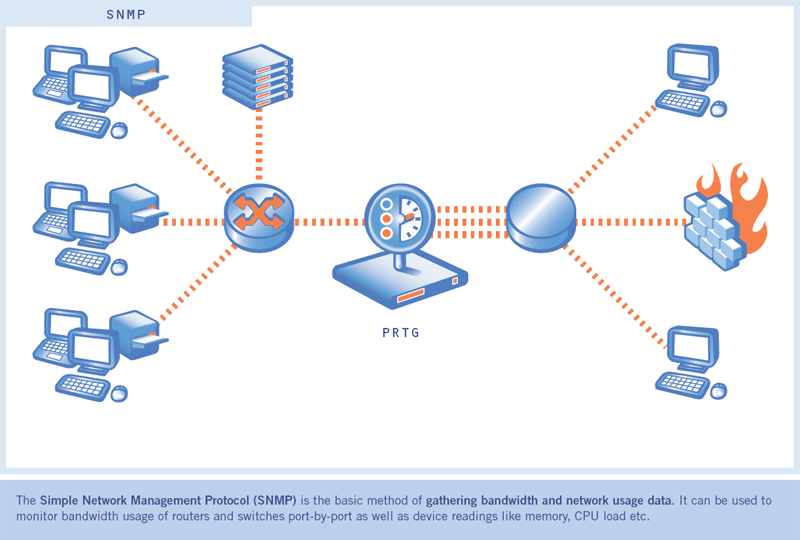
Note: SNMP is not unique to Unix. However, the reason it is listed under Unix is because the contributors have seen a majority of attacks on Unix systems caused by poor SNMP configurations. The contributors have not seen this as a major problem on Windows Systems.
Systems impacted:
All UNIX systems and network devicesCVE entries:
CAN-1999-0517, CAN-1999-0516, CAN-1999-0254, CAN-1999-0186How to determine if you are vulnerable:
Check to see if you have SNMP running on your devices. If you do, check the configuration files for the common vulnerabilities:- Default or blank SNMP community names
- Guessable SNMP community names
- Hidden SNMP community strings
How to protect against it:
The following steps will help defend against SNMP exploits:- If you do not absolutely require SNMP, disable it.
- If you must use SNMP, use the same policy for community names as used for passwords. Make sure they are difficult to guess or crack, and that they are changed periodically.
- Validate and check community names using snmpwalk. Additional information can be found at: http://www.zend.com/manual/function.snmpwalk.php
- Filter SNMP (Port 161/UDP) at the border-router or firewall unless it is absolutely necessary to poll or manage devices from outside of the local network.
- Where possible make MIBs read only. Additional information can be found at: http://www.cisco.com/univercd/cc/td/doc/cisintwk/ito_doc/snmp.htm#xtocid210315
1:28 AM 0
How Social Engineering Is Done : Be AWARE

Social engineering is the art and science of getting people to comply with an attacker's wishes. It is not a way of mind control, and it does not allow the attacker to get people to perform tasks wildly outside of their normal behavior. Above all, it is not foolproof. Yet, this is one way most Attackers get a foot into the corporation. There are two terms that are of interest here.
- Social engineering is hacker jargon for getting needed information from a person rather than breaking into a system.
- Psychological subversion is the term for using social engineering over an extended period of time to maintain a continuing stream of information and help from unsuspecting users.
Let us look at a sample scenario.
Attacker: "Good morning Ma'am, I am Bob; I would like to speak with Ms. Alice"
Alice: "Hello, I am Alice"
Attacker: "Good morning Ma'am, I am calling from the data center, I am sorry I am calling you so early..."
Alice:" Uh, data center office, well, I was having breakfast, but it doesn't matter"
Attacker: "I was able to call you because of the personal data form you filled when creating your account."
Alice: "My pers.. oh, yes"
Attacker: "I have to inform you that we had a mail server crash tonight, and we are trying to restore all corporate users' mail. Since you are a remote user, we are clearing your problems first."
Alice: "A crash? Is my mail lost?"
Attacker: "Oh no, Ma'am, we can restore it. But, since we are data center employees, and we are not allowed to mess with the corporate office user's mail, we need your password; otherwise we cannot take any action"(first try, probably unsuccessful)
Alice: "Er, my password? Well..."
Attacker: "Yes, I know, you have read on the license agreement that we will never ask for it, but it was written by the legal department, you know, all law stuff for compliance. (effort to gain victim's trust)
Attacker: Your username is AliceDxb, isn't it? Corporate sys dept gave us your username and telephone, but, as smart as they are, not the password. See, without your password nobody can access your mail, even we at the datacenter. But we have to restore your mail, and we need access. You can be sure we will not use your password for anything else, well, we will forget it." (smiling )
Alice: "Well, it's not so secret (also smiling! It's amazing...), my password is xxxxxx"
Attacker: "Thank you very much, Ma'am. We will restore your mail in a few minutes" Alice: "But no mail is lost, is it?"
Attacker: "Absolutely, Ma'am. You should not experience any problems, but do not hesitate to contact us just in case. You will find contact numbers on the Intranet"
Alice: "Thanks"
Attacker: "Goodbye"
9:26 PM 0
Hacking Tool Or Software used For Sniffing : Hacking Tools

-
Packetyzer Provides a Windows user interface for Ethereal. Available free from www.networkchemistry.com/products/packetyzer.php. -
Etherpeek A commercial sniffer that offers a GUI interface and is used on the Windows platform. It is available at www.etherpeek.com. -
Dsniff Part of a collection of tools for network auditing and hacking. Includes dsniff, filesnarf, mailsnarf, msgsnarf, urlsnarf, and webspy. These tools allow the attacker to passively monitor a network for interesting data such as passwords, email, files, and web traffic. The Windows port is available at www.datanerds.net/~mike/dsniff.html. -
TCPdump One of the most used network sniffer/analyzers for Linux. TCPdump is a command-line tool that is great for displaying header information. TCPdump is available at www.tcpdump.org. -
Windump A porting to the Windows platform of tcpdump, the most used network sniffer/analyzer for UNIX. This tool is similar to TCPdump in that it is a command-line tool that easily displays packet header information. It's available at www.winpcap.org/windump.
Any query or suggestion, do Contact us at upgoingstaar@gmail.com
Enjoy Hacking Enjoy Hackton
11:41 AM 0
List of All Trojans With their Port Numbers .. Continued

As Known, Each trojan work By Opening a Port on victim's computer and sends information(As Coded In trojan) from that port. Each Trojan has Its own predefined Port Number.
So in case u had been caugt with a trojan or either u r sending the same, You must be very known with Which trojan Works ON which Port Number and Protocol.
So here is the long List for The same.
TCP 1 Breach.2001, SocketsDeTroie.230, SocketsDeTroie.250
TCP 28 Amanda.200
TCP 31 MastersParadise.920
TCP 68 Subseven.100
TCP 142 NetTaxi.180
TCP 146 Infector.141, Intruder.100, Intruder.100
TCP 171 ATrojan.200
TCP 285 WCTrojan.100
TCP 286 WCTrojan.100
TCP 334 Backage.310
TCP 370 NeuroticKat.120, NeuroticKat.130
TCP 413 Coma.109
TCP 420 Breach.450
TCP 555 Id2001.100, PhaseZero.100, StealthSpy.100
TCP 623 Rtb666.160
TCP 660 Zaratustra.100
TCP 661 Noknok.800, Noknok.820
TCP 666 BackConstruction.210, BackConstruction.250, Bla.100, Bla.200, Bla.400, Bla.503, Cain.150, Dimbus.100, Noknok.820, Ripper.100, SatansBackdoor.100, SatansBackdoor.101, SatansBackdoor.102, Unicorn.100, Unicorn.101, Unicorn.110
TCP 667 SniperNet.210, Snipernet.220
TCP 668 Unicorn.101, Unicorn.110
TCP 680 Rtb666.160
TCP 777 Tiny.100, Undetected.230, Undetected.300, Undetected.310, Undetected.320, Undetected.330, Undetected.331, Undetected.332
TCP 785 NetworkTerrorist.100
TCP 800 NeuroticKitten.010
TCP 831 NeuroticKat.100, NeuroticKat.120, NeuroticKat.130
TCP 901 NetDevil.130, NetDevil.140
TCP 1000 DerSpaeher.200
TCP 1001 Silencer.100
TCP 1008 AutoSpy.100
TCP 1010 DerSpaeher.200
TCP 1015 Doly.150
TCP 1111 TPort.100
TCP 1130 Noknok.800, Noknok.820
TCP 1207 SoftWAR.100
TCP 1243 Subseven.100, SubSeven.110, SubSeven.180, SubSeven.190, Subseven.200
TCP 1245 VoodooDoll.006
TCP 1269 Matrix.130
TCP 1480 RemoteHack.130
TCP 1568 RemoteHack.100, RemoteHack.110
TCP 1600 DirectConnection.100
TCP 1601 DirectConnection.100
TCP 1602 DirectConnection.100
TCP 1634 NetCrack.100
TCP 1784 Snid.120, Snid.212
TCP 1999 TransmissionScout.100, TransmissionScout.110
TCP 2000 ATrojan.200, InsaneNetwork.400
TCP 2001 DIRT.220, TrojanCow.100
TCP 2003 TransmissionScout.100, TransmissionScout.110
TCP 2023 RipperPro.100
TCP 2040 InfernoUploader.100
TCP 2115 Bugs.100
TCP 2140 DeepThroat.100, DeepThroat.200, DeepThroat.310
TCP 2332 SilentSpy.202
TCP 2589 Dagger.140
TCP 2600 DigitalRootbeer.100
TCP 2989 Rat.200
TCP 3128 MastersParadise.970
TCP 3129 MastersParadise.920, MastersParadise.970
TCP 3150 DeepThroat.100, DeepThroat.200, DeepThroat.310, MiniBacklash.110
TCP 3215 BlackStar.100, Ghost.230
TCP 3333 Daodan.123
TCP 3410 OptixPro.100, OptixPro.110
TCP 3456 Force.155, TerrorTrojan.100
TCP 3505 AutoSpy.130, AutoSpy.140
TCP 3586 Snid.120, Snid.212
TCP 3700 PortalOfDoom.100
TCP 3723 Mantis.100
TCP 3800 Eclypse.100
TCP 3996 RemoteAnything.364
TCP 4000 SkyDance.220, SkyDance.229
TCP 4201 Wartrojan.160, Wartrojan.200
TCP 4225 SilentSpy.202
TCP 4321 Bobo.100
TCP 4444 AlexTrojan.200, Crackdown.100
TCP 4488 EventHorizon.100
TCP 4523 Celine.100
TCP 4545 InternalRevise.100, RemoteRevise.150
TCP 4567 FileNail.100
TCP 4666 Mneah.100
TCP 4950 ICQTrojan.100
TCP 5005 Aladino.060
TCP 5025 Keylogger.WMRemote.100
TCP 5031 NetMetro.104
TCP 5032 NetMetro.104
TCP 5033 NetMetro.104
TCP 5050 RoxRat.100
TCP 5151 OptixLite.020, OptixLite.030, OptixLite.040
TCP 5190 MBomber.100
TCP 5277 WinShell.400
TCP 5343 WCRat.100
TCP 5400 BackConstruction.120, BackConstruction.150, BladeRunner.080, DeepThroat.300
TCP 5401 BackConstruction.120, BackConstruction.150, BackConstruction.210, BackConstruction.250, BladeRunner.080, DeepThroat.300, Mneah.100
TCP 5402 BackConstruction.210, BackConstruction.250, BladeRunner.080, DeepThroat.300, Mneah.100
TCP 5534 TheFlu.100
TCP 5550 XTCP.200, XTCP.201
TCP 5555 Noxcape.100, Noxcape.200
TCP 5695 Assassin.100
TCP 5714 WinCrash.100
TCP 5741 WinCrash.100
TCP 5742 WinCrash.103
TCP 5802 Y3KRat.160
TCP 5810 Y3KRat.160
TCP 5838 Y3KRat.170
TCP 5858 Y3KRat.110, Y3KRat.120, Y3KRat.140
TCP 5880 Y3KRat.140
TCP 5881 Y3KRat.110, Y3KRat.120, Y3KRat.140
TCP 5882 Y3KRat.100, Y3KRat.110, Y3KRat.120, Y3KRat.140, Y3KRat.150
TCP 5883 Y3KRat.110, Y3KRat.140
TCP 5884 Y3KRat.140, Y3KRat.150
TCP 5885 Y3KRat.110, Y3KRat.120, Y3KRat.140
TCP 5886 Y3KRat.120, Y3KRat.140
TCP 5887 Y3KRat.110, Y3KRat.120, Y3KRat.140
TCP 5888 Y3KRat.100, Y3KRat.110, Y3KRat.120, Y3KRat.140, Y3KRat.150
TCP 5889 Y3KRat.100, Y3KRat.110, Y3KRat.120, Y3KRat.140, Y3KRat.150
TCP 5890 Y3KRat.140
TCP 6400 Thething.100, Thething.150
TCP 6556 AutoSpy.120, AutoSpy.122
TCP 6655 Aqua.020
TCP 6660 LameSpy.095
TCP 6666 LameRemote.100, ProjectMayhem.100
TCP 6669 Vampire.100
TCP 6670 DeepThroat.200, DeepThroat.210
TCP 6671 DeepThroat.310
TCP 6699 HostControl.101
TCP 6711 DeepThroat.300, Noknok.820, SubSeven.180, SubSeven.190
TCP 6712 Subseven.100
TCP 6713 Subseven.100
TCP 6767 NTRC.120
TCP 6776 SubSeven.180, SubSeven.190, Subseven.200
TCP 6789 Doly.200
TCP 6796 SubSeven.214
TCP 6912 ShitHeep.100
TCP 6939 Indoctrination.100
TCP 6953 Lithium.100
TCP 6969 2000Cracks.100, Bigorna.100, Danton.110, Danton.210, Danton.220, Danton.310, Danton.320, Danton.330, GateCrasher.110, NetController.108, Sparta.110, VagrNocker.120
TCP 6970 Danton.330
TCP 7001 Freak88.100
TCP 7119 Massaker.100
TCP 7200 Massaker.110
TCP 7300 Coced.221
TCP 7301 Coced.221
TCP 7306 NetSpy.200, NetSpy.200
TCP 7410 Phoenix.190, Phoenix.200
TCP 7511 Genue.100
TCP 7609 Snid.120, Snid.212
TCP 7614 Wollf.130
TCP 7648 BlackStar.100, Ghost.230
TCP 7788 Last.2000, Matrix.200
TCP 7826 MiniOblivion.010, Oblivion.010
TCP 7887 SmallFun.110
TCP 7891 Revenger.100
TCP 7979 VagrNocker.200
TCP 7997 VagrNocker.200
TCP 8000 XConsole.100
TCP 8011 Way.240
TCP 8012 Ptakks.215, Ptakks.217
TCP 8110 LoseLove.100
TCP 8111 LoseLove.100
TCP 8301 LoseLove.100
TCP 8302 LoseLove.100
TCP 8372 NetBoy.100
TCP 8720 Connection.130
TCP 8734 AutoSpy.110
TCP 8811 Force.155
TCP 8899 Last.2000
TCP 9000 Aristotles.100
TCP 9301 LoseLove.100
TCP 9400 InCommand.100, InCommand.110, InCommand.120, InCommand.130, InCommand.140, InCommand.150, InCommand.153, InCommand.160, InCommand.167, InCommand.170
TCP 9401 InCommand.100, InCommand.110, InCommand.170
TCP 9402 InCommand.100, InCommand.110
TCP 9561 CRatPro.110
TCP 9563 CRatPro.110
TCP 9580 TheefLE.100
TCP 9696 Danton.210, Ghost.230
TCP 9697 Danton.320, Danton.330, Ghost.230
TCP 9870 R3C.100
TCP 9872 PortalOfDoom.100
TCP 9873 PortalOfDoom.100
TCP 9874 PortalOfDoom.100
TCP 9875 PortalOfDoom.100
TCP 9876 Rux.100, SheepGoat.100
TCP 9877 SmallBigBrother.020
TCP 9878 SmallBigBrother.020, TransmissionScout.100, TransmissionScout.110, TransmissionScout.120
TCP 9879 SmallBigBrother.020
TCP 9999 ForcedEntry.100, Infra.100, Prayer.120, Prayer.130, TakeOver.200, TakeOver.300
TCP 10001 DTr.130, DTr.140
TCP 10013 Amanda.200
TCP 10067 PortalOfDoom.100
TCP 10100 Gift.240
TCP 10101 NewSilencer.100
TCP 10167 PortalOfDoom.100
TCP 10528 HostControl.100, HostControl.260
TCP 10607 Coma.109
TCP 10666 Ambush.100
TCP 11011 Amanda.200
TCP 11050 HostControl.101
TCP 11051 HostControl.100, HostControl.260
TCP 11223 AntiNuke.100, Progenic.100, Progenic.110
TCP 11225 Cyn.100, Cyn.103, Cyn.120
TCP 11306 Noknok.800, Noknok.820
TCP 11831 Katux.200, Latinus.140, Latinus.150, Pest.100, Pest.400
TCP 11991 PitfallSurprise.100
TCP 12043 Frenzy.2000
TCP 12345 Fade.100, Netbus.160, Netbus.170, VagrNocker.400
TCP 12346 Netbus.160, Netbus.170
TCP 12348 Bionet.210, Bionet.261, Bionet.280, Bionet.302, Bionet.305, Bionet.311, Bionet.313, Bionet.316, Bionet.317
TCP 12349 Bionet.084, Bionet.261, Bionet.280, Bionet.302, Bionet.305, Bionet.311, Bionet.313, Bionet.314, Bionet.316, Bionet.317, Bionet.401, Bionet.402
TCP 12389 KheSanh.210
TCP 12478 Bionet.210
TCP 12623 Buttman.090, Buttman.100
TCP 12624 Buttman.090, Buttman.100
TCP 12625 Buttman.100
TCP 12904 Akropolis.100, Rocks.100
TCP 13473 Chupacabra.100
TCP 13753 AFTP.010
TCP 14100 Eurosol.100
TCP 14194 CyberSpy.840
TCP 14286 HellDriver.100
TCP 14500 PCInvader.050, PCInvader.060, PCInvader.070
TCP 14501 PCInvader.060, PCInvader.070
TCP 14502 PCInvader.050, PCInvader.060, PCInvader.070
TCP 14503 PCInvader.050, PCInvader.060, PCInvader.070
TCP 14504 PCInvader.050, PCInvader.060
TCP 15092 HostControl.100, HostControl.260
TCP 15382 SubZero.100
TCP 15432 Cyn.210
TCP 15555 ICMIBC.100
TCP 16322 LastDoor.100
TCP 16484 MoSucker.110
TCP 16661 Dfch.010
TCP 16969 Progenic.100
TCP 16982 AcidShiver.100
TCP 17300 Kuang.200
TCP 17499 CrazzyNet.370, CrazzyNet.375, CrazzyNet.521
TCP 17500 CrazzyNet.370, CrazzyNet.375, CrazzyNet.521
TCP 17569 Infector.141, Infector.160, Infector.170, Infector.180, Infector.190, Infector.200, Intruder.100, Intruder.100
TCP 17593 AudioDoor.120
TCP 19191 BlueFire.035, BlueFire.041
TCP 19604 Metal.270
TCP 19605 Metal.270
TCP 19991 Dfch.010
TCP 20000 Millenium.100
TCP 20001 Millenium.100, PshychoFiles.180
TCP 20002 AcidKor.100, PshychoFiles.180
TCP 20005 MoSucker.200, MoSucker.210, MoSucker.220
TCP 21212 Schwindler.182
TCP 21554 Exploiter.100, Exploiter.110, Girlfriend.130, GirlFriend.135
TCP 21579 Breach.2001
TCP 21584 Breach.2001
TCP 21684 Intruse.134
TCP 22068 AcidShiver.110
TCP 22115 Cyn.120
TCP 22222 Prosiak.047, Ruler.141, Rux.300, Rux.400, Rux.500, Rux.600
TCP 22223 Rux.400, Rux.500, Rux.600
TCP 22456 Bla.200, Bla.503
TCP 22457 AcidShiver.120, Bla.200, Bla.503
TCP 22784 Intruzzo.110
TCP 22845 Breach.450
TCP 22847 Breach.450
TCP 23005 Infinaeon.110, NetTrash.100, Oxon.110, WinRat.100
TCP 23006 Infinaeon.110, NetTrash.100, Oxon.110, WinRat.100
TCP 23032 Amanda.200
TCP 23432 Asylum.010, Asylum.012, Asylum.013, Asylum.014, MiniAsylum.110
TCP 23456 EvilFTP.100, VagrNocker.400
TCP 23476 DonaldDick.153, DonaldDick.154, DonaldDick.155
TCP 23477 DonaldDick.153
TCP 24000 Infector.170
TCP 24307 Wildek.020
TCP 25386 MoonPie.220
TCP 25486 MoonPie.220
TCP 25555 FreddyK.100, FreddyK.200
TCP 25556 FreddyK.100
TCP 25685 MoonPie.010, MoonPie.012, MoonPie.130, MoonPie.220, MoonPie.240, MoonPie.400
TCP 25686 MoonPie.135, MoonPie.200, MoonPie.400
TCP 25982 MoonPie.135, MoonPie.200
TCP 26274 Delta.050
TCP 27160 MoonPie.135, MoonPie.200
TCP 27184 Alvgus.100, Alvgus.800
TCP 27374 Muerte.110, Subseven.210, SubSeven.213
TCP 28429 Hack'a'Tack.2000
TCP 28430 Hack'a'Tack.2000
TCP 28431 Hack'a'Tack.2000
TCP 28432 Hack'a'Tack.2000
TCP 28433 Hack'a'Tack.2000
TCP 28434 Hack'a'Tack.2000
TCP 28435 Hack'a'Tack.2000
TCP 28436 Hack'a'Tack.2000
TCP 29559 DuckToy.100, DuckToy.101, Katux.200, Latinus.140, Latinus.150, Pest.100, Pest.400
TCP 29891 Unexplained.100
TCP 30000 Infector.170
TCP 30001 Error32.100
TCP 30003 LamersDeath.100
TCP 30029 AOLTrojan.110
TCP 30100 NetSphere.127, NetSphere.130, NetSphere.131
TCP 30101 NetSphere.127, NetSphere.130, NetSphere.131
TCP 30102 NetSphere.127, NetSphere.130, NetSphere.131
TCP 30103 NetSphere.131
TCP 30947 Intruse.134
TCP 31320 LittleWitch.400, LittleWitch.420
TCP 31337 BackOrifice.120, Khaled.100, OPC.200
TCP 31415 Lithium.101
TCP 31416 Lithium.100, Lithium.101
TCP 31557 Xanadu.110
TCP 31631 CleptoManicos.100
TCP 31745 Buschtrommel.100, Buschtrommel.122
TCP 31785 Hack'a'Tack.100, Hack'a'Tack.112
TCP 31787 Hack'a'Tack.100, Hack'a'Tack.112
TCP 31789 Hack'a'Tack.100, Hack'a'Tack.112
TCP 31791 Hack'a'Tack.100, Hack'a'Tack.112
TCP 31887 BDDT.100
TCP 31889 BDDT.100
TCP 32100 ProjectNext.053
TCP 32418 AcidBattery.100
TCP 32791 Akropolis.100, Rocks.100
TCP 33291 RemoteHak.001
TCP 33333 Blackharaz.100, Prosiak.047, SubSeven.214
TCP 33577 SonOfPsychward.020
TCP 34324 TelnetServer.100
TCP 34763 Infector.180, Infector.190, Infector.200
TCP 35000 Infector.190, Infector.200
TCP 35600 Subsari.140
TCP 36794 BugBear.100
TCP 37237 Mantis.020
TCP 37651 YAT.210
TCP 37653 YAT.310
TCP 40308 Subsari.140
TCP 40412 TheSpy.100
TCP 40421 MastersParadise.970
TCP 40422 MastersParadise.970
TCP 40999 DiemsMutter.110, DiemsMutter.140
TCP 41626 Shah.100
TCP 44444 Prosiak.070
TCP 45673 Akropolis.100, Rocks.100
TCP 47262 Delta.050
TCP 48006 Fragglerock.200
TCP 49683 HolzPferd.210
TCP 50000 Infector.180
TCP 50130 Enterprise.100
TCP 50766 Fore.100
TCP 51234 Cyn.210
TCP 51966 Cafeini.080, Cafeini.110
TCP 54321 PCInvader.010
TCP 57341 NetRaider.100
TCP 57922 Bionet.084
TCP 58008 Tron.100
TCP 58009 Tron.100
TCP 59090 AcidReign.200
TCP 59211 DuckToy.100, DuckToy.101
TCP 59345 NewFuture.100
TCP 60000 DeepThroat.300, MiniBacklash.100, MiniBacklash.101, MiniBacklash.101
TCP 60411 Connection.100, Connection.130
TCP 60412 Connection.130
TCP 60552 RoxRat.100
TCP 63536 InsaneNetwork.500
TCP 63878 AphexFTP.100
TCP 63879 AphexFTP.100
TCP 64969 Lithium.100
TCP 65000 Socket.100
UDP 1 SocketsDeTroie.250
UDP 666 Bla.200, Bla.400, Bla.503, Noknok.820
UDP 1130 Noknok.800, Noknok.820
UDP 2140 DeepThroat.100, DeepThroat.200, DeepThroat.310
UDP 2989 Rat.200
UDP 3128 MastersParadise.970
UDP 3129 MastersParadise.920, MastersParadise.970
UDP 3150 DeepThroat.100, DeepThroat.200, DeepThroat.310, MiniBacklash.110
UDP 3333 Daodan.123
UDP 3800 Eclypse.100
UDP 3996 RemoteAnything.364
UDP 4000 RemoteAnything.364
UDP 5555 Daodan.123
UDP 5881 Y3KRat.110, Y3KRat.140
UDP 5882 Y3KRat.100, Y3KRat.110, Y3KRat.120, Y3KRat.140, Y3KRat.150
UDP 5883 Y3KRat.110, Y3KRat.140
UDP 5884 Y3KRat.140, Y3KRat.150
UDP 5885 Y3KRat.110, Y3KRat.120, Y3KRat.140
UDP 5886 Y3KRat.120, Y3KRat.140
UDP 5887 Y3KRat.110, Y3KRat.120, Y3KRat.140
UDP 5888 Y3KRat.100, Y3KRat.110, Y3KRat.120, Y3KRat.150
UDP 6953 Lithium.100
UDP 8012 Ptakks.217
UDP 10067 PortalOfDoom.100
UDP 10167 PortalOfDoom.100
UDP 10666 Ambush.100
UDP 11225 Cyn.100, Cyn.103, Cyn.120
UDP 11306 Noknok.800, Noknok.820
UDP 12389 KheSanh.210
UDP 12623 Buttman.090, Buttman.100
UDP 12625 Buttman.100
UDP 14100 Eurosol.100
UDP 23476 DonaldDick.155
UDP 26274 Delta.050
UDP 27184 Alvgus.100
UDP 28431 Hack'a'Tack.2000
UDP 28432 Hack'a'Tack.2000
UDP 28433 Hack'a'Tack.2000
UDP 28434 Hack'a'Tack.2000
UDP 28435 Hack'a'Tack.2000
UDP 28436 Hack'a'Tack.2000
UDP 29891 Unexplained.100
UDP 30103 NetSphere.131
UDP 31320 LittleWitch.400, LittleWitch.420
UDP 31337 BackOrifice.120, OPC.200
UDP 31416 Lithium.100, Lithium.101
UDP 31789 Hack'a'Tack.100, Hack'a'Tack.112
UDP 31791 Hack'a'Tack.100, Hack'a'Tack.112
UDP 33333 Blackharaz.100
UDP 47262 Delta.050
UDP 49683 HolzPferd.210
UDP 60000 MiniBacklash.100
Hopes u guys find it Useful.
Enjoy Hacking Enjoy Hackton
9:28 AM 0
Check Whether Your Antivirus Is best Or Not | Working properly Or Not

1. Open a notepad (New Text Document.TXT) and copy the following code exactly onto it, and save the notepad.
2. Rename the file from New Text Document.TXT to myfile.comEICAR Test codeX5O!P%@AP[4\PZX54(P^)7CC)7}$EICAR-STANDARD-ANTIVIRUS-TEST-FILE!$H+H*
3. Now run the antivirus scan on this myfile.com file.
If the antivirus is functioning properly on your computer, then it should generate a warning and immediately delete the file upon scanning. Otherwise you may have to re-install your antivirus.
NOTE: Most antivirus will pop-out a warning message in the Step-1 itself
You can also place the myfile.com file in a ZIP or RAR file and run a scan on it so as to ensure whether your antivirus can detect the test string in the compressed archive. Any antivirus when scanning this file will respond exactly as it will do for a genuine virus/malicious code. This test will cause no damage to your computer even though the antivirus will flag it as a malicious script. Hence it is the safest method to test the proper functioning of any antivirus.9:16 AM 0
How To Guess A Password : Methodology

When password guessing is successful, it is usually because people like to use easy to remember words and phrases. A diligent penetration tester or attacker will look for subtle clues throughout the enumeration process to key in onprobably words or phrases the account holder might have used for a password. What do you know about this individual, what are his hobbies? If the account holder is not known to you, focus on accounts that
- Haven't had password changes for a long time
- Weakly protected service accounts
- Poorly shared accounts
- Indicate the user has never logged in
- Have information in the comment field that might be used to compromise password security
If you can identify such an account, the net use command can be issued from the command line to attempt the connection:
Net use * \\target_IP\share * /u:nameYou'll be prompted for a password to complete the authentication.
C:\>net use * \\192.188.13.10\c$ * /u:jack
Type the password for \\172.20.10.79\c$:
The command completed successfully
It's not always that easy, so you might have to try multiple times or even consider looping the process. Performing automated password guessing can be performed by constructing a simple loop using the NT/2000/XP shell. It is based on the standard NET USE syntax. The steps are as follows:
- Create a simple username and password file.
- Pipe this file into a FOR command as follows:
C:\> FOR /F "token=1, 2*" %i in (credentials.txt)
   do net use \\target\IPC$ %i /u: %j
Note
Make sure that you identify if there is a password lockout policy. Otherwise, you might inadvertently cause a denial of service (DoS) if you lock out all the users.
If the manual password guessing process does not work for you, there are always tools. Several tools are explored next.
Automated Password Guessing
NetBIOS Auditing Tool (NAT) is a command-line automated password guessing tool. Just build a valid list of users from the tools discussed during enumeration. Save the usernames to a text file. Now create a second list with potential passwords. Feed both of these into NAT, as follows:
nat [-o filename] [-u userlist] [-p passlist]
NAT will attempt to use each name to authenticate with each password. If it is successful, it will halt the program at that point. Then you will want to remove that name and start again to find any additional matches. You can grab a copy of NAT at ftp://ftp.technotronic.com/microsoft/nat10bin.zip.
Legion automates the password guessing in NetBIOS sessions. Legion is a GUI tool that will scan multiple Class C IP address ranges for Windows shares and also offers a manual dictionary attack tool. It can be downloaded from www.elhacker.net/hacking.htm.
Tip
If you are not sure of the lockout policy, target the guest account first; you are notified when you reach the lockout threshold.
Hopes, u enjoy the Tut. Any Help or query. feel free to Ask.
Enjoy hacking, Enjoy Hackton
8:09 PM 1
Easiest Example Of SQL Injection : Just For Beginners

Here is a sample basic HTML form with two inputs, login and password.
The easiest way for the login.asp to work is by building a database query that looks like this:
SELECT id
FROM login
WHERE username = '$username'
AND password = '$password’
If the variables $username and $password are requested directly from the user's input, this can easily be compromised. Suppose that we gave "Joe" as a username and that the following string was provided as a password: anything' OR 'x'='x
SELECT id
FROM login
WHERE username = 'Joe'
AND password = 'anything' OR 'x'='x'
As the inputs of the web application are not properly sanitised, the use of the single quotes has turned the WHERE SQL command into a two-component clause.
The 'x'='x' part guarantees to be true regardless of what the first part contains.
This will allow the attacker to bypass the login form without actually knowing a valid username / password combination!
Now this ws how to Make a simple web attack with sql injection....Bt for security Professionals.>> How To Protect it.
So here we go for that as well..
How To prevent SQL Injection attacks?
Firewalls and similar intrusion detection mechanisms provide little defense against full-scale web attacks. Since your website needs to be public, security mechanisms will allow public web traffic to communicate with your databases servers through web applications. Isn’t this what they have been designed to do?
Patching your servers, databases, programming languages and operating systems is critical but will in no way the best way to prevent SQL Injection Attacks.
Any queries or Suggestions , Do Contact The Admin..
Enjoy Hackton
8:40 AM 0
Overview Of Proxy Servers And Anonymizers

Proxy is a network computer that can serve as an intermediate for connection with other computers. They are usually used for the following purposes:
- As firewall, a proxy protects the local network from outside access.
- As IP-addresses multiplexer, a proxy allows to connect a number of computers to Internet when having only one IP-address.
- Proxy servers can be used (to some extent) to anonymize web surfing.
- Specialized proxy servers can filter out unwanted content, such as ads or ‘unsuitable’ material.
- Proxy servers can afford some protection against hacking attacks.

- Anonymizers are services that help make your own web surfing anonymous.
- The first anonymizer developed was Anonymizer.com, created in 1997 by Lance Cottrell.
- An anonymizer removes all the identifying information from a user’s computers while the user surfs the Internet, thereby ensuring the privacy of the user.
8:51 PM 0
Subscribe to:
Posts (Atom)

 Posts

