
Showing posts with label TipsAndReviews. Show all posts
Showing posts with label TipsAndReviews. Show all posts
Top 10 Essential tools for Hacking Wireless Networks

Laptop Computer
For starters, you’ve got to a have a good test system — preferably a portable laptop computer. Although it is possible to perform wireless-security testing using a handheld device such as a Pocket PC, the tools available on such devices are limited compared to those on a laptop system.
Due to the multiple operating system requirements of the popular wireless testing tools, we recommend using either a system that can dual boot Windows (preferably 2000 or XP) and Linux (any recent distribution will do) or a Windows-based system running a virtual machine program (such as VMware) on which you can install multiple operating systems. The hardware requirements for systems running a single operating system are pretty minimal given today’s standards. A system with a Pentium III or equivalent processor, 256MB RAM, and at least a 30–40GB hard drive should be more than enough. If you’ll be running VMware or another virtual machine program, you’ll want to at least double this amount of RAM and hard drive space.
Wireless Network Card
In addition to the laptop, you’ve got to have a good wireless network-interface card (NIC). Look for a PC Card NIC that’s not only compatible with the various wireless tools, but one that also has a connector for an external antenna so you can pick up more signals. The Orinoco Gold card (and its re-badged equivalents) serves both purposes very well. Many wireless NICs built in to today’s laptops are good general purpose cards, but your test results may be limited due to the shorter radio range capability of the internal antennas.
Antennas and Connecting Cables
A high-gain unidirectional or omnidirectional antenna — or cantenna — will do wonders for you when you’re scanning your airwaves for wireless systems. When you’re shopping for antennas, look for one with a pigtail connection that matches the type of connector you have on your wireless NIC. Also be aware that the length of these pigtail cables should be kept as short as possible. Because they’re made with a very thin microwave coax, these cables have fairly high signal losses at microwave frequencies and with the connectors placed on either end of the pigtail cable. To avoid high cable losses, you should not use a pigtail cable longer than 5 feet.
GPS Receiver
If you’ll be war-walking/driving/flying — or if your wireless systems span across a large building or campus environment — then it’s time to think globally: A global positioning satellite (GPS) receiver will come in handy. With a GPS receiver, you’ll be able to integrate your wireless testing software and pinpoint the locations of wireless systems within a few meters.
Stumbling Software
To get your wireless testing rolling, wireless stumbling software is essential; you can use it to map out things like SSIDs, signal strength, and systems using WEP encryption. Software you can use for this includes Network Stumbler for Windows or your wireless NIC management software. For really basic stumbling, you can even use the management software built in to Windows XP.
Wireless Network Analyzer
To probe deep into the airwaves, a network analyzer is essential. Programs such as Kismet, AiroPeek, and ethereal can help you monitor multiple wireless channels, view protocols in use, look for wireless system anomalies — and even capture wireless data right out of thin air.
Port Scanner
A port scanner such as nmap or SuperScan is a great tool for scanning the wireless systems you stumble across to find out more about what’s running and what’s potentially vulnerable.
Vulnerability Assessment Tool
A vulnerability-assessment tool such as Nessus, LANguard Network Security Scanner, or QualysGuard is great for probing your wireless systems further to find out which vulnerabilities actually exist. This information can then be used to poke around further and see what the bad guys can see and even potentially exploit.
It’s not only a great reference tool, but the Google search engine can also be used for searching Network Stumbler .NS1 files, digging in to the Web-server software built in to your APs, finding new wireless-security testing tools, researching vulnerabilities, and more. The Google taskbar (downloadable for Internet Explorer, built in to FireFox) makes your searching even easier.
An 802.11 Reference Guide
While performing ongoing ethical hacks against your wireless systems, you’ll undoubtedly need a good reference guide on the IEEE 802.11 standards at some time or another. The 802.11 wireless protocol is very complex and will evolve over time. You’ll likely need to look up information on channel frequency ranges, what a certain type of packet is used for, or perhaps a default 802.11 setting or two. The Cheat Sheet, the wireless resources found in Appendix A in this book, as well as Peter’s book Wireless
11:56 PM 0
Null Session Port Number 139 Vulnerability Of Windows Default Shares

Enabling file sharing on Windows machines makes them vulnerable to both information theft and certain types of quick-moving viruses. Macintosh and Unix computers are also vulnerable to file sharing exploits if users enable file sharing.
The SMB mechanisms that permit Windows File Sharing may also be used by attackers to obtain sensitive system information from Windows systems. User and Group information (usernames, last logon dates, password policy, RAS information), system information, and certain Registry keys may all be accessed via a “null session” connection to the NetBIOS Session Service. This information is useful to hackers because it helps them mount a password guessing or brute force password attack against the Windows target.
Systems impacted:
Microsoft Windows NT and Windows 2000 systemsCVE entries:
CVE-1999-0366, CVE-2000-0222, CVE-2000-0979, CAN-1999-0518, CAN-1999-0519,CAN-1999-0520, CAN-1999-0621, CAN-2000-1079
How to determine if you are vulnerable:
A quick, free, and secure test for the presence of SMB file sharing and its related vulnerabilities, effective for machines running any Windows operating system, is available at the Gibson Research Corporation web site at http://grc.com/. Click the “ShieldsUP” icon to receive a real-time appraisal of any system's SMB exposure. Detailed instructions are available to help Microsoft Windows users deal with SMB vulnerabilities. Note that if you are connected over a network where some intermediate device blocks SMB, the ShieldsUP tool will report that you are not vulnerable when, in fact, you are. This is the case, for example, for users on a cable modem where the provider is blocking SMB into the cable modem network. ShieldsUP will report that you are not vulnerable. However, the 4,000 or so other people on your cable modem link can still exploit this vulnerability.The Microsoft Personal Security Advisor, will report whether you are vulnerable to SMB exploits, and can also fix the problem. Since it runs locally, its results will always be reliable. It is available at: http://www.microsoft.com/technet/security/tools/mpsa.asp
How to protect against it:
Take the following steps to defend against unprotected shares:- When sharing data, ensure only required directories are shared.
- For added security, allow sharing only to specific IP addresses because DNS names can be spoofed.
- For Windows systems (both NT and 2000), use file system permission to ensure that the permissions on the shared directories allow access only to those people who require access.
- For Windows systems, prevent anonymous enumeration of users, groups, system configuration and registry keys via the “null session” connection. See item W5 for more information
- Block inbound connections to the NetBIOS Session Service (tcp 139) and Microsoft CIFS (TCP/UDP 445) at the router or the host.
- Consider implementing the RestrictAnonymous registry key for Internet-connected hosts in standalone or non-trusted domain environments. For more information see the following web pages:
- Windows NT 4.0: http://support.microsoft.com/support/kb/articles/Q143/4/74.asp
- Windows 2000: http://support.microsoft.com/support/kb/articles/Q246/2/61.ASP
Hopes You guys enjoyed the article, Enjoy Hacking Enjoy Hackton.
9:22 AM 1
A Breif Overview On Types Of Port Scanning

Port scanning is the process of connecting to TCP and UDP ports on the target system to determine what services are running or in a listening state. Identifying listening ports is essential to determine the type of operating system and application in use on the system.
Types of port scanning:
- TCP connect scan: This type of scan connects to the target port and completes a full three-way handshake (SYN, SYN/ACK and ACK).
- TCP SYN scan: This is also called half-open scanning because it does not complete the three-way handshake, rather a SYN packet is sent and upon receiving a SYN/ACK packet it is determined that the target machines port is in a listening state and if an RST/ACK packet is received , it indicates that the port is not listening.
- TCP FIN scan: This technique sends a FIN packet to the target port and based on RFC 793 the target system should send back an RST for all closed ports.
- TCP Xmas Tree scan: This technique sends a FIN, URG and PUSH packet to the target port and based on RFC 793 the target system should send back an RST for all closed ports.
- TCP Null scan: This technique turns off all flags and based on RFC 793, the target system should send back an RST for all closed ports.
- TCP ACK scan: This technique is used to map out firewall rule sets. It can help determine if the firewall is a simple packet filter allowing only established connections or a stateful firewall performing advance packet filtering.
- TCP Windows scan: This type of scan can detect both filtered and non-filtered ports on some systems due to anomaly in the way TCP windows size is reported.
- TCP RPC scan: This technique is specific to UNIX systems and is used to detect and identify Remote Procedure Call (RPC) ports and their associated program and version number.
- UDP scan: This technique sends a UDP packet to the target port. If the target ports responds with an "ICMP port unreachable" message, the port is closed, if not then the port is open. This is a slow process since UDP is a connectionless protocol; the accuracy of this technique is dependent on many factors related to utilization of network and system resources.
11:30 AM 0
Default SNMP Settings : Full Of Vulnerabilities For Hackers
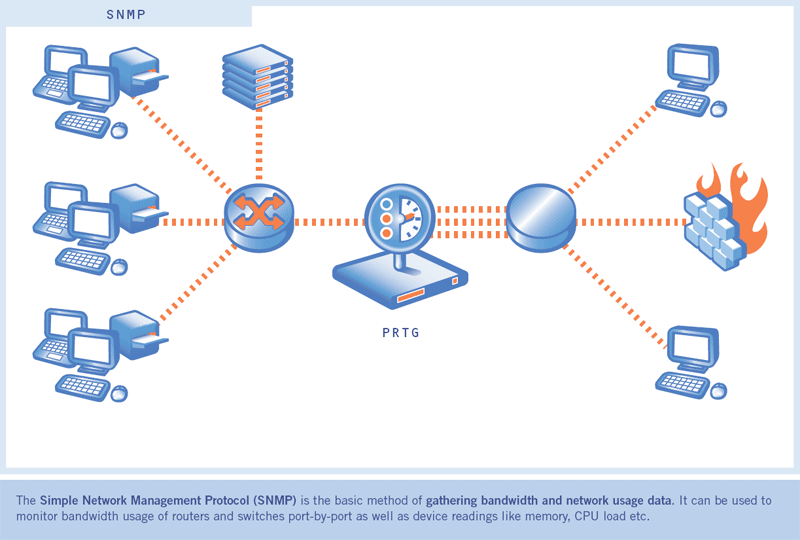
Note: SNMP is not unique to Unix. However, the reason it is listed under Unix is because the contributors have seen a majority of attacks on Unix systems caused by poor SNMP configurations. The contributors have not seen this as a major problem on Windows Systems.
Systems impacted:
All UNIX systems and network devicesCVE entries:
CAN-1999-0517, CAN-1999-0516, CAN-1999-0254, CAN-1999-0186How to determine if you are vulnerable:
Check to see if you have SNMP running on your devices. If you do, check the configuration files for the common vulnerabilities:- Default or blank SNMP community names
- Guessable SNMP community names
- Hidden SNMP community strings
How to protect against it:
The following steps will help defend against SNMP exploits:- If you do not absolutely require SNMP, disable it.
- If you must use SNMP, use the same policy for community names as used for passwords. Make sure they are difficult to guess or crack, and that they are changed periodically.
- Validate and check community names using snmpwalk. Additional information can be found at: http://www.zend.com/manual/function.snmpwalk.php
- Filter SNMP (Port 161/UDP) at the border-router or firewall unless it is absolutely necessary to poll or manage devices from outside of the local network.
- Where possible make MIBs read only. Additional information can be found at: http://www.cisco.com/univercd/cc/td/doc/cisintwk/ito_doc/snmp.htm#xtocid210315
1:28 AM 0
How Social Engineering Is Done : Be AWARE

Social engineering is the art and science of getting people to comply with an attacker's wishes. It is not a way of mind control, and it does not allow the attacker to get people to perform tasks wildly outside of their normal behavior. Above all, it is not foolproof. Yet, this is one way most Attackers get a foot into the corporation. There are two terms that are of interest here.
- Social engineering is hacker jargon for getting needed information from a person rather than breaking into a system.
- Psychological subversion is the term for using social engineering over an extended period of time to maintain a continuing stream of information and help from unsuspecting users.
Let us look at a sample scenario.
Attacker: "Good morning Ma'am, I am Bob; I would like to speak with Ms. Alice"
Alice: "Hello, I am Alice"
Attacker: "Good morning Ma'am, I am calling from the data center, I am sorry I am calling you so early..."
Alice:" Uh, data center office, well, I was having breakfast, but it doesn't matter"
Attacker: "I was able to call you because of the personal data form you filled when creating your account."
Alice: "My pers.. oh, yes"
Attacker: "I have to inform you that we had a mail server crash tonight, and we are trying to restore all corporate users' mail. Since you are a remote user, we are clearing your problems first."
Alice: "A crash? Is my mail lost?"
Attacker: "Oh no, Ma'am, we can restore it. But, since we are data center employees, and we are not allowed to mess with the corporate office user's mail, we need your password; otherwise we cannot take any action"(first try, probably unsuccessful)
Alice: "Er, my password? Well..."
Attacker: "Yes, I know, you have read on the license agreement that we will never ask for it, but it was written by the legal department, you know, all law stuff for compliance. (effort to gain victim's trust)
Attacker: Your username is AliceDxb, isn't it? Corporate sys dept gave us your username and telephone, but, as smart as they are, not the password. See, without your password nobody can access your mail, even we at the datacenter. But we have to restore your mail, and we need access. You can be sure we will not use your password for anything else, well, we will forget it." (smiling )
Alice: "Well, it's not so secret (also smiling! It's amazing...), my password is xxxxxx"
Attacker: "Thank you very much, Ma'am. We will restore your mail in a few minutes" Alice: "But no mail is lost, is it?"
Attacker: "Absolutely, Ma'am. You should not experience any problems, but do not hesitate to contact us just in case. You will find contact numbers on the Intranet"
Alice: "Thanks"
Attacker: "Goodbye"
9:26 PM 0
Introduction To All Warez Commonly Used

ISO:
A file that is created from an image of a CD. You can make an iso yourself with a program such as Adaptec Easy CD Creator, or you can burn an ISO file to a CD-R to create a copy of a CD.
Bin/cue files:
These are also used to create an image of a CD. Most people burn these with CdrWin or Fireburner. The .bin file contains all the data for the cd, the .cue file is just a small file in text format telling the software exactly how to burn the data onto the CD.
MP3:
Don't know what these are? What cave have you been you living in? This is a format used to compress music files. You can create your own by encoding .wav files ripped from audio CDs. There are many free players that will play mp3s for you (see the Winamp tutorial)
Ace files:
These are used to compress/archive data. Use WinAce to decompress them, or to make your own. The normal format for ace files is to have .ace, .c01, .c01, etc.
Rar files:
Another compression/archive format. This is most commonly used on iso or bin files in order to split them up into smaller files (15 MB is the norm). Winrar and many other utilities can decompress these. Rar files are usually in the format .rar, .r01, .r02, etc. But don't be surprised if you don't see a .rar file. Just open up winrar and point it to .r01. You also may see them packed as .001, .002, etc. (maybe with a .rar, maybe not)
Pub:
This is an FTP that has left on anonymous access. Many are owned by large companies, so they have a lot of bandwidth. This makes it possible for one person to send files there and many people can download them at once =) These are found by scanning ranges of ips (see the FTP tutorial). Just remember, like the name says, these are public. Just because you upload something there or make directories with your name does not make it 'your pub'. At the same time, realize that if you come across a pub with another person/groups stuff on it that it may be in use to build other pubs from - so don't ruin it for many people by deleting stuff you find there. For more on this, go read some posts on our Bulletin Board.
Proxy:
A system that is set up to forward packets... There are many different kinds, check out the proxy tutorial for more info. Basically, a proxy server helps cover up your tracks because you connect to remote computers through the proxy. Think of it as the condom of the Internet
SFV Files/ CRC Checks:
SFV files contain information about files that they accompany. You can preform a CRC check on the files using a program such as WinSFV. This compares the information in the SFV file to the file itself. If the information doesn't match, then the file was probably messed up in transfer somehow.. try downloading it again, from a different source if possible.
0-Day:
Latest software releases.
0-Sec:
Same as above, although the period of time between ripping a game or application and it appearing on a warez site is even shorter.
Ace File:
The first file in a series of compressed archives (the one you double click on to decompress all the files at once).
Active List:
Similar to a mailing list, but uses ICQ to send instant messages to subscribers.
Alpha:
Software receives this label when it is in the very early stages of development. Usually full of bugs, so don't touch it with a barge pole.
Anti-Leech:
A system which uses cgi scripts to prevent people stealing links and then taking the credit for uploading the files.
Appz:
Short for applications. For example Flash 5 or GoLie 5.5.
ASF File:
The worst quality movie file format (still pretty good though), much smaller in size than dat or mpg.
Banner Site:
Password and username restricted FTP site. To get the correct login details you must click on several banners.
Beta:
An acronym for Business Software Alliance, an organisation who are responsible for enforcing anti-piracy litigation. Similar groups in charge of controlling software "theft" include the SIIA, SPA and ELSPA.
BSOD:
Many people read about BSODs on bulletin boards and think that they're being insulted, but there is no need to get paranoid. It is actually an acronym for "Blue Screen Of Death". These can occur for a multitude of reasons (old Bill likes to keep us guessing!) and are the bane of PC user's lives.
Bulletin Board:
A virtual meeting place on the web similar to a chat room except that it isn't in real time. One person leaves a message then others come along, read it and add a reply. Each new discussion is called a new topic or thread and has it's own link. Whenever a new topic is created the older topics are pushed one place downwards in the list. When someone replies to an older topic it is brought back to the top of the list.
C?? File:
File extension that indicates that a file is part of an .ace or .rar series of compressed files.
Cgi Scripts:
These are referrers which are used in url’s. When you click on a link with a ?cgi reference you are directed to a sponsor’s website or an anti-leech protected file.
Cookie:
A tiny text file (usually less than 1kb), which is stored on your hard drive when you visit a web site. These are used to remember who you are so that you can access members only areas on the site without having to type in a password every time or to retain your personalised settings so that they are available the next time you visit.
Courier:
Someone who is involved in the logistics of delivering new releases directly from the release groups themselves to FTP sites.
Crack:
A tiny executable file that is used to transform a shareware program into the full version. Also used to remove any copy protection from the main executable of games (this will already have been done in "ripped" warez games).
CRC Error:
These can occur when you try to decompress a file that has become corrupt during the downloading process, usually as a result of too much resuming.
Credits:
The amount of data you are permitted to download from a ratio site. The more credits you have the more software you are allowed to download.
DAP:
A quick way of referring to "Download Accelerator Plus", a free download manager that claims to speed up file transfers by up to three hundred per cent. It works by making multiple connections to the same file and is paid for by revolving advertising banners.Also supports resume. **EDITOR'S PICK**
DAT File:
File format used for movies, identical in quality and size to mpg as far as I can tell.
DC:
The lazy way of referring to the Dreamcast, Sega's latest console incarnation.
Decompression:
Unpacking many files that have been stored in a single archive.
Distro:
A concise means of referring to a distribution FTP site. These are huge storage areas which act as a springboard for the transfer of new releases. Their whereabouts are never public disclosed to aid their survival rate. You can think of them as the initial source from which warez emanates.
Direct Downloads
Links to actual files rather than other warez sites or pages. These are usually gathered together from many different sites and put on one page for your convenience.
DivX:
Movies ripped from a DVD using the DivX video codecs. Can be played back using Media Player.
DIZ File:
Short for description. Very brief text file found in warez archives stating the title of the software, the number of files that makes up the set and the group who released it.
Download (or DL):
Copying files from a web server or FTP site to your computer using a modem.
Emulator:
An application that simulates another computer system or console using your PC.
FAQ:
Stands for Frequently Asked Questions.
FAW:
Abbreviation for "Files Anywhere", a popular, free web storage service.
File Transfer Protocol (FTP):
The method used to transfer files from one computer to another using a modem.
Flaming:
A general net term for "verbally" attacking someone. This can be done via email, bulletin board, chat room or any medium which involves communication across the web.
Freedrive:
Virtual hard drive storage area on the web. Free to join and anything and everything can be uploaded or downloaded.
Freeware:
Unrestricted software that is downloaded from the net and is completely free to use. Often paid for using advertising.
FTP Client / Browser:
A program used to access, upload and download data from FTP sites.
Fxp:
The art of transferring data from one Ftp site to another using the connection speed of the slower of the two computers.
Gamez:
Pretty self-explanatory this one.
Getright:
One of the best download managers available.
Gold:
A piece of software is said to have gone gold when the final version is complete and it is ready to ship to the public.
Gozilla:
Another excellent download manager.
Hacking:
Gaining access to a remote computer without the authorisation to do so. Usually for the purposes of stealing confidential information or the malicious destruction of data.
Hammering:
Repeatedly trying to access an FTP site using an FTP client or download manager.
HTTP:
Stands for "Hypertext Transfer Protocol". The method you use to view a web page. Always comes before the address of a website in your Url bar.
ICQ:
Derives from the term "I Seek You" and is used for real time chat and transferring files over the internet.
IP Address:
A series of numbers separated by dots used to identify your computer on the Internet.
IRC:
Stands for "Instant Relay Chat". Used for real time chat and transferring files over the Internet.
Java:
Html scripts used to add functionality to or bring web pages alive. These include animation (such as the title graphic on my main page), menus, chat rooms, buttons, pop ups and so on.
Key Generator:
A tiny executable program that is capable of creating a serial number from a specified username. These are specific to particular applications or utilities, so a serial number created with one key generator will only work for the program for which the key generator was developed.
Lamer:
An annoying and overused general derogatory term used to insult/put down anyone and everything.
Leeching:
Downloading files without giving anything back in return or copying other people’s links.
Mirror:
An exact copy of a web site that is stored on a different server. Using multiple locations for warez sites allows the site to be accessed using a different address if the main site is deleted.
Modchip:
Very common website sponsor found on warez sites. They don’t mind their banners being used on illegal software sites because their products are one of the “grey areas” of the law. Modchips are small pieces of electronic circuitry which allow copied games to be played on your Playstation. If a Playstation has been fitted with a Modchip it is said to have been "chipped".
MP3 File:
Compressed music file format. Average track size is between 3 and 4 meg compared to 40-ish meg in wav format.
MPG File:
The best quality and largest movie file format.
Multi Web Space Faker:
A tool used to create lots of free web space accounts simultaneously.
Name Zero:
An organisation that offers free website domain names. The main drawbacks are that you have to put up with a very bulky banner residing at the bottom of your page and the fact that you never actually own your chosen address.
NFO File:
Short for info or information. Basic text file containing all the important details relating to a particular release, such as number of files, release date, copy protection system, installation instructions etc.
Nuked:
A release is said to be nuked if it is completely unplayable. Usually when this happens another group re-releases the particular game, although fixes do sometimes follow on to rescue the game from trash can.
OEM:
An acronym for Original Equipment Manufacturer. OEM software products are repackaged versions of the full retail product. They are often re-branded to suit the needs of the particular vender and are much more reasonable priced because they lack excessive packaging and a hard copy of the manual.
OST:
Not strictly a warez term this one, but one that you are likely to come across while searching for MP3 music. It stands for original soundtrack (movie music).
Patch:
We all know games and applications aren't perfect. When they are released we would hope that they have been thoroughly tested for bugs and incompatibility problems, but you can guarantee that many of these will still slip through the quality control net. Once the program is released to the general public, the bug reports start to flood in. A patch is a downloadable executive file which takes these reports into account and attempts to incorporate all the fixes for these known problems. A patch can resolve incompatibility problems, prevent crashes or improve the performance of a piece of software.
Piracy:
The replication and distribution of videos or computer software.
Pop-ups:
Irritating browser windows that open automatically when you visit a warez site. Usually contain voting portals or porn sites.
Port:
A port is a term used when referring to FTP sites and is an essential extension of the address used to access them. If the port number of an FTP site isn't specified the default setting of 21 will automatically be used.
Pron:
A long time ago in a galaxy far, far away someone posted a request for porn on a bulletin board, only, because of a typing error what he ended up asking for was "pron". Since then this has become a bit of a running joke and so it is now deliberately misspelled.
Proxy:
A third party server which acts as an anonymous go between whenever you request a web page or contact a remote server. The message from your computer is first sent through the proxy server before being relayed to the final destination so that it appears as though the request has come from the IP address of the proxy server rather than you. Used when you wish to maintain your privacy on the net or speed up your connection (much more detailed info on this subject in the "more tips" section).
Psx:
A quick way of referring to the Sony Playstation.
Pub:
A free for all FTP site where anonymous access is permitted.
Pub Scanner:
Someone who scours the net for anonymous access FTP sites which permit the creation and deletion of files. These are then exploited by uploading software for others to share.
Pub Stealer:
Someone who posts the IP address of a public FTP site which they themselves have not built. Some pub stealers justify this by claiming that the elitism of private FXP groups discriminates against those people who do not have access, yet others simply post other people's work to try to claim the credit for themselves. Either way though, pub stealers are despised by the FXP groups and praised by those who would otherwise not have access to them.
Rar File:
The first file in a series of compressed archives (the one you double click on to decompress all the files at once). Usually decompressed using a program called Winrar.
Release Groups:
A group of people who are involved in cracking and / or ripping software and then repackaging it into easily downloadable segments.
Ratio:
Two numbers separated by a semi-colon. Indicates how much data you must upload to an FTP site before you are permitted to download anything.
Reg File:
Tiny file that adds essential configuration details into the registry.
Resume:
The ability to stop and start downloading / uploading a file whenever you choose without having to start from the beginning again.
Rip:
Software that has had all the non-essential gubbins removed to reduce its size. Videos and music are always the first casualties.
Raped:
A release is branded with this term if it has been damaged beyond repair during the ripping process.
RM File:
Shorthand for Real Media, a file format used to encode video sequences, which can only be played back using the "Real Player". Video clips produced using this format are not of the highest quality, but do have the advantage of a small file size.
ROM:
Games which are designed for other platforms, but are played on the PC using an emulator.
Serial:
A valid username and password that is saved as a basic text file and is used to register a shareware program and therefore remove all the restrictions.
Shareware:
Try before you buy software downloaded from the net.
Spam:
Unsolicited junk e-mail. Supposedly stands for "Stupid Person's Annoying Message".
Sponsor:
To make some money webmasters can place adverts on their sites. Each time you click on these adverts or banners they get paid a few cents for bringing potential customers to the sponsors website.
Surfer Friendly (SF):
Surfer friendly sites supposedly have no blind links, pop-ups or porn banners. Don't be fooled by this label though as some sites will tell you fibs to get you to visit them.
Sys Op:
The person who has the responsibility for running the computer from which an FTP site has been established. When warez is uploaded to public FTP sites and then suddenly goes "Missing In Action" you can often lay the blame at the door of the Sys Op who has an obligation to make sure his/her server stays within the boundaries of the law (i.e. warez free).
Top List:
Chart which lists in rank order the best warez sites. Worked out on the basis of votes.
Trading:
Swapping warez, file for file via FTP, ICQ etc. Not usually approved of by the real warez community who believe that warez should be freely distributed. To put it simply, it is not the "warez way".
Trainer:
A small, executable program which sits in your taskbar while you play a game. Hotkeys are associated with cheat commands so that when they are pressed you are given extra ammo, weapons, lives or the ability to toggle between invincible/mortal modes etc etc.
Trojans:
Nasty virus like attachments which can be merged with executable files. These are tiny so are unlikely to arouse suspicion. When run they allow a hacker to access your computer and wreak havoc. Can occasionally be found in warez files.
UBB:
Shorthand for Ultimate Bulletin Board, currently the most popular script used for creating warez bulletin boards.
UBB Hacks:
This term falsely gives the impression that something destructive or malicious is involved, but when you hear people talking about a hack in the context of bulletin boards they are simply referring to code which helps to improve the functionality of a board. For example a "thread hack" would effect the way in which individual threads look and operate.
Undeletable Pub:
An anonymous access, public FTP site where the permission attributes are set to allow uploads and downloads, but do not permit deletion.
Unzip:
Unpacking or decompressing many files that have been stored in a single archive. Technically only used when talking about zip files.
Upload:
Copying files from your computer to a web server or FTP site using a modem.
URL:
Stands for "Uniform Resource Locator". The web site address you type into your browser.
Voting:
Members of the warez scene are very keen to reach the number one slot of top lists such as Voodoo, Top 60 etc. and will therefore encourage you to vote for their site to improve their position and get the credit they deserve (or not as the case may be!).
Warez:
Full version software that is uploaded to the internet and is available for free download.
Warez Board:
Bulletin board used by the warez community to share links and discuss anything related to warez.
Winace:
Another utility used for decompressing all the common archive formats. Not great in my opinion. See below for a better one.
Winrar:
Utility used for decompressing .rar files and much more.
Winzip:
An essential tool used to decompress warez files.
Zip:
A common compression format used to store warez .
9:46 AM 2
Check Whether Your Antivirus Is best Or Not | Working properly Or Not

1. Open a notepad (New Text Document.TXT) and copy the following code exactly onto it, and save the notepad.
2. Rename the file from New Text Document.TXT to myfile.comEICAR Test codeX5O!P%@AP[4\PZX54(P^)7CC)7}$EICAR-STANDARD-ANTIVIRUS-TEST-FILE!$H+H*
3. Now run the antivirus scan on this myfile.com file.
If the antivirus is functioning properly on your computer, then it should generate a warning and immediately delete the file upon scanning. Otherwise you may have to re-install your antivirus.
NOTE: Most antivirus will pop-out a warning message in the Step-1 itself
You can also place the myfile.com file in a ZIP or RAR file and run a scan on it so as to ensure whether your antivirus can detect the test string in the compressed archive. Any antivirus when scanning this file will respond exactly as it will do for a genuine virus/malicious code. This test will cause no damage to your computer even though the antivirus will flag it as a malicious script. Hence it is the safest method to test the proper functioning of any antivirus.9:16 AM 0
How To Guess A Password : Methodology

When password guessing is successful, it is usually because people like to use easy to remember words and phrases. A diligent penetration tester or attacker will look for subtle clues throughout the enumeration process to key in onprobably words or phrases the account holder might have used for a password. What do you know about this individual, what are his hobbies? If the account holder is not known to you, focus on accounts that
- Haven't had password changes for a long time
- Weakly protected service accounts
- Poorly shared accounts
- Indicate the user has never logged in
- Have information in the comment field that might be used to compromise password security
If you can identify such an account, the net use command can be issued from the command line to attempt the connection:
Net use * \\target_IP\share * /u:nameYou'll be prompted for a password to complete the authentication.
C:\>net use * \\192.188.13.10\c$ * /u:jack
Type the password for \\172.20.10.79\c$:
The command completed successfully
It's not always that easy, so you might have to try multiple times or even consider looping the process. Performing automated password guessing can be performed by constructing a simple loop using the NT/2000/XP shell. It is based on the standard NET USE syntax. The steps are as follows:
- Create a simple username and password file.
- Pipe this file into a FOR command as follows:
C:\> FOR /F "token=1, 2*" %i in (credentials.txt)
   do net use \\target\IPC$ %i /u: %j
Note
Make sure that you identify if there is a password lockout policy. Otherwise, you might inadvertently cause a denial of service (DoS) if you lock out all the users.
If the manual password guessing process does not work for you, there are always tools. Several tools are explored next.
Automated Password Guessing
NetBIOS Auditing Tool (NAT) is a command-line automated password guessing tool. Just build a valid list of users from the tools discussed during enumeration. Save the usernames to a text file. Now create a second list with potential passwords. Feed both of these into NAT, as follows:
nat [-o filename] [-u userlist] [-p passlist]
NAT will attempt to use each name to authenticate with each password. If it is successful, it will halt the program at that point. Then you will want to remove that name and start again to find any additional matches. You can grab a copy of NAT at ftp://ftp.technotronic.com/microsoft/nat10bin.zip.
Legion automates the password guessing in NetBIOS sessions. Legion is a GUI tool that will scan multiple Class C IP address ranges for Windows shares and also offers a manual dictionary attack tool. It can be downloaded from www.elhacker.net/hacking.htm.
Tip
If you are not sure of the lockout policy, target the guest account first; you are notified when you reach the lockout threshold.
Hopes, u enjoy the Tut. Any Help or query. feel free to Ask.
Enjoy hacking, Enjoy Hackton
8:09 PM 1
Enhance Your Browsing Experience With Hyperwords

While browsing it is easy to find information that you would like to know more about, convert, or translate. The Hyperwords extension provides access to these types of resources and more in Firefox.
Using Hyperwords
Once the extension has finished installing you will be presented with a demo video that will let you learn more about how Hyperwords works.

For our first example we chose to look for more information concerning “WASP-12b” using Wikipedia. Notice the small bluish circle on the lower right of the highlighted term…it is the default access for the Hyperwords menu (access by hovering mouse over it).

If you hover over the Wikipedia (or other) link you can access the information in a scrollable popup window.

Or if you prefer click on the link to view the information in a new tab. Choose the style that best suits your needs.

Hyperwords is extremely useful for quick unit conversions.

Suppose you want to share a news story that you have found while browsing. Highlight the title, access Hyperwords, and choose your preferred sharing source.

You may need to authorize access for Hyperwords to post to your account.

Once you have authorized access you can start sharing those links very easily. This is just a small sampling of Hyperwords many useful features.

Preferences
Hyperwords has a nice set of preferences available to help you customize it. Alter the menu popup style, add or remove menu entries, and modify other functions for Hyperwords.

Conclusion
Hyperwords makes a nice addition to Firefox for anyone needing quick access to search, reference, translation, and other services while browsing.
Links
Download the Hyperwords extension (Mozilla Add-ons)
Download the Hyperwords extension (Extension Homepage)
8:47 PM 0
The Way On How To Search Google The Better Way

Type the following highlited words in google search box.
Google has several google operators that can help you find specific information, specific websites or inquire about the indexing of your own site, below you will find the most important ones: Click on the example google trick, and You will be redirected to google.
define: - This google operator will find definitions for a certain term or word over the Internet. Very useful when you come across a strange word when writing a post. I use this as a google dictionary. example : (define computer)
info: - The google info operator will list the sets of information that Google has from a specific website (i.e. info:http://hack2007.50webs.com)
site: - This google operator can be used to see the number of indexed pages on your site (i.e.site:www.hack2007.50webs.com). Alternative it can also be used to search for information inside a specific site or class of sites.
link: - This google link operator allows you to find backlinks pointing to your site. Unfortunately the count is not updated frequently and not all backlinks are shown
allinurl: - Using this Google operator will limit the search to results that contain the desired keywords on the URL structure. (i.e. allinurl:dailyblogtips)
fileformat: - Useful Google operator for finding specific file formats. Sometimes you know that the information you are looking for is likely to be contained in a PDF document or on a PowerPoint presentation, for instance. (i.e. “fileformat:.pdf market research” will search for PDF documents that contain the terms “market” and “research”)
Google trick -2 Top 10 Cool Google Search Tricks
well as we have gained enough knowledge regarding google operators, lets have a look at the following 10 cool google search tricks. Click on the example google trick, and You will be redirected to google.
- Google trick to search different file formats (keyword filetype:doc)
- Google trick to search educational resources (keyword site:.edu) example (computer site:.edu)
- Finding the time of any location (time romania)
- Finding the weather of any location (boston weather)
- Tracking commentary of live events (Olympic games Beijing 2008)
- Using Google as a calculator (9 * 10)(143+234)(119-8)
- Converting currencies (1 USD in INR)(10 US Dollars in Indian Rupee)
- Find how many teaspoons are in a quarter cup (quarter cup in teaspoons)
- how many seconds there are in a year (seconds in a year)
- Tracking stocks (stocks:MSFT)
- Finding faces (add imgtype=face to the URL)
google trick -3 Top Essential Google Search shortcuts
#1: Get Local Weather
Type: “weather [city name or zip/postal code]” Example: “weather 500054″ or “weather boston”
#2: Check Flight Status
Google automagically pulls flight data from FlightStats.com. All you have to do is enter the flight number. Type: [flight name and/or number] Example: “bc254″ or “newyork21″
#3: Convert Distances
Type: “[value] [first distance unit] to [second distance unit]” Example: “100 kilometers to miles”
#4: Find a Phone Number
Find a Person:
Type: “[person’s name], [city or zip/postal code]” Example: “john smith, london”
Find a Business/store:
Type: “[business name or type], [city or zip/postal code]” Example: “book store, boston”
Google trick -4 :Google search trick for Rapidshare files search:
#1 site:rapidshare.com inurl:users "*"
#2 site:rapidshare.de inurl:users "*"
#3 site:rapidshare.com inurl:files "*"
#4 site:rapidshare.de inurl:files "*"
#5 site:rapidshare.com inurl:users (pass|password)
#6 site:rapidshare.de inurl:users (pass|password)
Suppose u need some info on ebooks. Then u can try following keyword to see all rapidshare folders having any hacking related thing in it
site:rapidshare.com inurl:users "ebooks"
#2 site:rapidshare.de inurl:users "*"
#3 site:rapidshare.com inurl:files "*"
#4 site:rapidshare.de inurl:files "*"
#5 site:rapidshare.com inurl:users (pass|password)
#6 site:rapidshare.de inurl:users (pass|password)
Suppose u need some info on ebooks. Then u can try following keyword to see all rapidshare folders having any hacking related thing in it
site:rapidshare.com inurl:users "ebooks"
10:31 PM 0
BitDefender Total Security 2010 *full and portable

Features and Benefits
Confidently download, share and open files from friends, family, co-workers – and even total strangers
* Protects against viruses and other malware using industry-leading technology NEW
* Scans all Web, e-mail and instant messaging traffic in real-time
* Provides an unmatched detection rate of new threats based on two different proactive technologies
* Blocks spyware programs that track your online activities
Protect your identity: shop, bank, listen and watch, privately and securely
* Blocks web pages that attempt to steal your credit card data
* Prevents personal information from leaking via e-mail, Web or instant messagingNEW
* File Shredder permanently erases sensitive files and traces of files
Guard your files and conversations with top-of-the line encryption
* Instant Messaging Encryption keeps your conversations private on Yahoo! and MSN Messenger
* File Vault securely stores personal information or sensitive files
* Automatically backs up files and folders
Connect securely to any network at home, at the office, or away
* The two-way firewall automatically secures your Internet connection wherever you are
* Wi-Fi monitor helps prevent unauthorized access to your Wi-Fi network
Protect your family and their computers
* Parental Control blocks access to inappropriate websites and e-mail
* Limits kids’ access the Internet, games, etc. to specific times
* Makes it easy for you to manage the security of your network from a single location
Play safely, play seamlessly
* Reduces the system load and avoids requesting user interaction during game play
Get fine-tuned performance from your computer!
* Removes unnecessary files & registry entries, for improved performance
* Optimized scanning technology skips safe files for better scan speed and lower system load
* Antispam stops unwanted e-mail from reaching your Inbox
* Laptop Mode prolongs battery life
Let professionals solve any security issues
* Assistance with common issues built directly into the product
* Free technical support for the entire duration of the product license
DOWNLOAD:
portable
http://hotfile.com/dl/18066593/cfce231/BitDefender_Total_Security_2010.rar.html
full
Uploading Links :-
http://uploading.com/files/b39f5e5m/BD.totalsecurity.2010.32b.part1.rarhttp://uploading.com/files/m962c5d9/BD.totalsecurity.2010.32b.part2.rar
Uploading Links :-
http://uploading.com/files/5346fc68/BitDefender_2010_All_versions_Crack.rar
7:15 AM 0
Overview Of Proxy Servers And Anonymizers

Proxy is a network computer that can serve as an intermediate for connection with other computers. They are usually used for the following purposes:
- As firewall, a proxy protects the local network from outside access.
- As IP-addresses multiplexer, a proxy allows to connect a number of computers to Internet when having only one IP-address.
- Proxy servers can be used (to some extent) to anonymize web surfing.
- Specialized proxy servers can filter out unwanted content, such as ads or ‘unsuitable’ material.
- Proxy servers can afford some protection against hacking attacks.

- Anonymizers are services that help make your own web surfing anonymous.
- The first anonymizer developed was Anonymizer.com, created in 1997 by Lance Cottrell.
- An anonymizer removes all the identifying information from a user’s computers while the user surfs the Internet, thereby ensuring the privacy of the user.
8:51 PM 0
Overview Of Credit Card Hack : How to Do

The Attack
The fatal flaw that enabled the sensitive information to be stolen is possible when an end-user is not properly educated on an easy to do and well-known SSL exploit – SSL MITM.Here’s how it’s done:
The hacker goes to coffee shop and connects to the same Wi-Fi network you are connected to. He runs a series of utilities to redirect other user’s data through his machine. He runs a number of other utilities to sniff the data, act as an SSL Certificate Server and to be the Man-the-Middle. The following diagram shows a very simplified graphic of how your SSL Banking session should work under normal conditions, then how it would work during an attack:

Figure 3

Figure 4
This is a bad thing if you have a “Fake” certificate being sent from the hacker, and you are actually connecting to his machine, not directly to the bank’s website. In this case, your credentials are being transmitted between your browser and the hacker’s machine. The hacker is able to grab that traffic, and, because he gave you the certificate to encrypt the data/credentials, he can use that same certificate to decrypt your data/credentials.
Here are the exact steps a hacker could use to perform this attack:
The first thing he would do is turn on Fragrouter, so that his machine can perform IP forwarding

Figure 5

Figure 6

Figure 7

Figure 8

Figure 9

Figure 10

Figure 11
With this information, he can now log into your Online Banking Account with the same access and privileges as you. He could transfer money, view account data, etc.
Below is an example of a sniffed SSL credit card purchase/transaction. You can see that Elvis Presley was attempting to make a purchase with his credit card 5440123412341234 with an expiration date of 5/06 and the billing address of Graceland in Memphis, TN (He is alive!). If this was your information, the hacker could easily make online purchases with your card.

Figure 12
Also Real Bad News for SSL VPN Admins
This type of attack could be particularly bad for corporations. The reason for this is that Corporate SSL VPN solutions are also vulnerable to this type of attack. Corporate SSL VPN solutions will often authenticate against Active Directory, the NT Domain, LDAP or some other centralized credentials data store. Sniffing the SSL VPN login then gives an attacker valid credentials to the corporate network and other systems.What an End-User Needs To Know
There’s a big step and end-user can take to prevent this from taking place. When the MITM Hacker uses the “bad” certificate instead of the “good”, valid certificate, the end-user is actually alerted to this. The problem is that most end-users don’t understand what this means and will unknowingly agree to use the fake certificate. Below is an example of the Security Alert an end-user would receive. Most uneducated end-users would simply click “Yes”… and this is the fatal flaw:
Figure 13

Figure 14
(Good Certificate) (Bad Certificate)

Figure 15
(Good Certificate) (Bad Certificate)

Figure 16
(Good Certificate) (Bad Certificate)
How an End-User Can Prevent This
- Again, the simple act of viewing the certificate and clicking “No” would have prevented this from happening.
- Education is the key for an end-user. If you see this message, take the time to view the certificate. As you can see from the examples above, you can tell when something doesn’t look right. If you can’t tell, err on the side of caution and call your Online Bank or the Online store.
- Take the time to read and understand all security messages you receive. Don’t just randomly click yes out of convenience.
How a Corporation Can Prevent This
- Educate the end-user on the Security Alert and how to react to it.
- Utilize One Time Passwords, such as RSA Tokens, to prevent the reuse of sniffed credentials.
- When using SSL VPN, utilize mature products with advanced features, such as Juniper’s Secure Application Manager or Network Connect functionality.
Conclusion
This type of attack is relatively easy to do in a public Wi-Fi hotspot environment. It could also easily happen on a home Wi-Fi network, if that Wi-Fi network isn’t properly configured and allows a hacker to connect to that home network (See Essential Wireless Hacking Tools for more info on securing your home network). An educated end-user and sound security practices by corporations can protect your valuable data.5:32 AM 0
Subscribe to:
Posts (Atom)

 Posts
Posts

