
Showing posts with label Security. Show all posts
Showing posts with label Security. Show all posts
Getting Rid from Adwares and Spywares

Do you consider yourself a smart Web Surfer or downloader? Do
you consider yourself immune to threat from spywares, known for tracking and
monitoring you silently. Then I must say you are not. To support this, let me
figure out some points-
1. Most
commonly they are installed on our system as a hidden program, behind something
legitimate which you had given permission. They may be in form of installation
programs, or drive by downloads, i.e. asking you for a plugin in order to view
a page.
2. Unlike
other programs, these spywares always work in stealth mode so that you can
never got to know about the program. You would not even see them in task
manager, in add/remove programs, etc.
3. Popups,
unwanted websites, unknown errors, slower pc, are very clear indication of
spywares.
Guess why someone would create adware or spywares? A simple
thought, they can send you unwanted ads for which they can be paid by the
companies thy advertise for, or they can report your name, email address, and
other information to a survey company.
Now lets talk about the removal of adware. The methodology
which most of the adware/spyware removal tools use is similar to antiviruses.
They also maintain a library of spyware filenames and registry keys and then
searching and removing them from systems.
However the first thing I would suggest you to install is a
firewall so that no one can get access to your system. This would even work in
the case when your system is already infected.
In fact most of the operating systems nowadays comes with default
firewalls within them. Some other firewalls that may of your interest are :
a. Zone Alarm [http://www.zonealarm.com]
b. Sygate
Personal Pro [http://www.tucows.com/thankyou.html?swid=213160]
c. Kerio Personal
Firewall
d. AVG
Internet Security Firewall [http://www.avg.com/us-en/home-small-office-security]
But again I would say that getting a good firewall do not
ends the story. Its just a part of solution. Besides frewalls, you must also
use one or more anti-spywares to check your system for current infections. As
an add-on safety, I would recommend you o use spyware removal tools to make
your system more infection free. These all are useful for this task:
a. Spybot [http://spybot-virus-scan.com]
b. Webroot Spy
Sweeper [http://webroot.com/wb/products/spysweeper]
c. Spyware
Doctor [http://pctools.com/spyware-doctor]
d. Bazooka [http://www.kephyr.com/spywarescanner]
e. Hijack This
[http://spychecker.com/program/hijackthis.html] [Advanced
Users]
Some of them can even deal with the things in which
antiviruses do not takes interest. These things include ad-ware, Trojans, key
loggers, track wares, etc. Along with scanning part, they would tell you how to
uninstall them these potentially unwanted apps, and that’s too with step by
step instructions.
I assures you going ahead with this procedure will simply
make you immune to spyware and ad wares, apart from your expertise in web
surfing.
12:52 PM 0
Small Discussion on DNS Security

You might have heard of DNS Attack, DNS spoofing, etc many times. So here i am going to discuss a general DNS Security case sttudy.
DNS cache poisoning (also known as DNS cache pollution) is a maliciously created or unintended situation that provides data to a Domain Name Server that did not originate from authoritative DNS sources. It occur if DNS "spoofing attack" has been encountered. An attacker will send malicious data / non-secure data in response to a DNS query.
For the simplest scenario, a cleint sends DNS server a question , "What is the Ip adress of Hackplane.in" ?
Now DNS server gives it the answer. if the answer matches the question, the client will trust that it had got a right answer.
BUt here it must be noted that there are various ways in which this process can be intercepted or changed or impersonated so that wrong answer can be given and thereby making client go for something wrong.
Here i am attaching an image for better understanding of this concept.

Click On the Image for Enlarging. :)
Now How does one spoof a response.
1. A question is sent by the cleint and then it waits for the answer.
Well, the question arises that how the client is gonna trust the spoofed answers. So there are someof the attributes by which t identifies it.
a) It comes back to same ip it was sent from.
b) It comes to the same port number it was sent from.
c) Answer mathces the asked question.
d) A uinque transaction number.
In order to spoof a message we need to find out all these attributes. We need to have the Ip Address of recursive name server, question whichh the cleintsend, so as to inject the answer, the port number, and the uninque sequence number. What clicks my mind for all this informaiton is WIRESHARK. :P
Now Whats new??
Dam kaminsky identified that there is a way by which we can directly flood the recursivve server with lots f answers so that a right combination may go in a hit. (But actually it would not take a long time, so dn start putting on ur brains).
Now if the Name server deals with authoritative as well as recursive responses, any such attack can store bad data and that may be forwarded to lame computers that want authoritative responses.
For somehow controlling this:-
1. Sequence numbers must be randomized with a greater frequency.
2. Recursive name servers must be disabled (and if not disabled, must be restricted to only required number of users).
3. Diffrent Port numbers(apart from 53, default one fixed by IANA) must be used.
4. More emphasis on encrypted data must be laid on.
5. DNS SEC (DNS Security policy must be used).
For a clear logic, jst cop up with the folllowing if else statment.
If DNS is not recursive, it is safe.
If DNS is recursive, then if it provides good randomness or sequence numbers, then it is OKAY ( A mid position, neither too secure nor too vulnerable).
If DNS is not recursive as well as it do not provide good randomness, it is highly vulnerable.
Enjoy Hacking. :)
3:25 AM 2
Tools to prevent data loss

Data loss refers to unexpected loss of data or information and therefore backup and recovery of data must be developed to restore the lost data.
Here I am including some of the best tools to prevent data loss :
Security platform: BorderWare security platform removes the need for deploying a new device to protect against new messaging applications by integrating email, IM , web security with a single policy and single security system. It is actually a monitoring and filtering tool which prevents data leakage.
Check Point Software: Pointsec data encryption solutions by check point provide data protection on laptops, PCs, mobile device, and removable media. By leveraging a strong and efficient blend of full disk encryption, access control, port management, removable media encryption , it delivers a comprehensive data security.
Cross Road Systems – DBProtector : it provides database security at a logical business policy level and stops “authorized misuse” of database information. DBProtector provides policy-based intrusion detection, prevention, and compliance auditing.
Device Wall : it prevents the transfer of files to or from unauthorized portable devices. It also automatically encrypts data copied to approved devices. Moreover it also provide complete audits trails of device and file access.
Exeros Discovery: Exeros discovery software automates discovery and maintenance of business rules, transformations, hidden sensitive data, and data inconsistencies across structured data sources. It uses a unique technology of data driven mapping to replace the traditional manual process of analyzing source data and mapping it to another dataset.
Procurve Identity Driven manager : Procurve Identity Driven Manager configures security and performance settings based on system, user, device, location, time, client system state. It enables us to to be able to centrally define and apply policy-based network access rights that allow network to automatically adapt to needs of users and devices as they connect.
Event Tracker: being my favorite event tracker is solution that features real time collection of all logs, secure, tamper-proof and encrypted log storage, and real tie slog analysis, and reporting as well.
Verdasys’ Digital Guardian is a data security solution for protecting and tracking the flow of critical data. Digital Guardian logs user data transactions and applies predefined rules to ensure that end users are using applications and data properly.
Websense Content protection suite: This package is a comprehensive solution to address the growing need for robust information leak prevention. It provides superior protection to secure and manage , who, what, how and where.
Elcomsoft Distributed Password recovery: Elcomsoft password recovery is a password recovery tool , as it suggests from its name ;) . It is used to crack complex passwords, recover strong encryption keys, and unlock ducuments in a protected environment. It is a high end solution for forensic and government agencies, data recovery, and password recovery services.
2:56 AM 1
Enable/Disable Button Scam Spreading on facebook
Researchers from Sophos have spotted a currently circulating “Enable Dislike Button” Facebook scam.
Upon clicking on the what looks like a recently added genuine Facebook feature, users are exposed to a “Follow the steps below to get the Dislike button” instructions page similar to the one seen in the Osama Execution Video Scam.
Spamvertised as:

Once the users copy and paste the obfuscated javascript in their browsers, all of their friends will be spamvertised with a wall post about the non-existent Dislike feature. The campaigners appear to be monetizing the campaign through a survey scam.
For the time being, Facebook doesn’t offer a dislike button.
And for any such confirmation, visit official facebook blog sites rather then believing the general people.
Upon clicking on the what looks like a recently added genuine Facebook feature, users are exposed to a “Follow the steps below to get the Dislike button” instructions page similar to the one seen in the Osama Execution Video Scam.
Spamvertised as:
Facebook now has a dislike button! Click ‘Enable Dislike Button’ to turn on the new feature!
Once the users copy and paste the obfuscated javascript in their browsers, all of their friends will be spamvertised with a wall post about the non-existent Dislike feature. The campaigners appear to be monetizing the campaign through a survey scam.
For the time being, Facebook doesn’t offer a dislike button.
And for any such confirmation, visit official facebook blog sites rather then believing the general people.
9:29 AM 0
How to be safe on Facebook in times of spams.

In this time of increasing frauds, spams and hacks going on, how could facebook (world's second m,ost used website) be spared. You can see some new spam or hack methodology coming out everyday and compromising accounts of lame people. For those who are noobs to such things, there are some of the settings which must be implemented in order to be safe from such stuff. here are some of those settings.
1. Who can see what?
Your first stop should be your privacy settings, which you can get to under "Account" at the top right of any page.Here, make sure you're using a set of custom settings. Click "Customize settings" under the grid on that page to see who can see which parts of your Facebook profile.
Unless you use your Facebook account as a public page, every option should at least be set to "Friends Only." From there, you can make each setting more specific, keeping your photos hidden for certain people, for example.
2. Place your friends in lists
To make the previous tip more powerful, place your Facebook friends in lists. If you begin to define lists such as Coworkers, Best Friends, Employees, Students, etc., you can set each of your settings to be visible or not visible to a whole list of people.To do this go to "Edit Friends" under the Account menu. Type in a friend's name and add it to a list.
Then you can make sure that only your best friends, for example, can see the photos you post. Or you can make sure that your students or employees don't see your status updates.
You can also add a friend to a list as you accept their friend request.
3. How secure is your password?
This is the front line to your Facebook security and should be taken seriously. Good passwords include capital letters, punctuation, numbers and words that can't be found in the dictionary.Resist using anything that someone who knows you well enough could guess (kids, pets, phone numbers, etc.).
If you think for any reason that your account's security has been breached, change your password immediately. Doing so will end every active session of Facebook for your account, locking out anyone else but you.
4. Who can find you?
Facebook also allows you to set what people see if they're not your friend. Under privacy settings, click "View Settings" under the "Connecting on Facebook" setting at the top of the page.Here, you can set what people see when they search for you on Facebook.
Pay special note to the bottom option, which allows you to set who can see what you have "liked" on Facebook. Many don't realize that by default this option is set to show everyone on the Web what you like.
Don't want that future employer to know that you "like" naps or skipping class? This is a good thing to check.
5. What does my profile look like to Grandpa?
Even the most conscientious Facebook user can miss a check box or two, putting his or her entire weekend escapade on Facebook for Grandpa to see.But the good news is that you can preview what your profile looks like to any of your friends, many of whom can see different things depending on how advanced you have set your privacy settings.
In your privacy settings, click "Customize Settings" then "Preview My Profile."
Here, you'll be able to type in any friend's name and see exactly what they see. Very handy.
6. Browse Facebook securely
One of Facebook's most vulnerable features is that much of your browsing is done without a secure connection to the Web site. Hackers have exploited this hole by accessing your personal information if you use Facebook on a public or unsecured WiFi network.In your account settings, choose Account Security. There's a check box there to enable secure browsing whenever possible. Check that.
You'll soon see that Facebook will be using https:// instead of http://. That's how you know you're more secure.
7. Who is logging in as you?
One of Facebook's greatest security features is the ability to individually approve each computer or mobile device that logs into your account.You can name each computer you use Facebook with (work, home, laptop, iPhone, etc.).
To turn this on, go to your account settings, click on "Account Security" and choose that you want an e-mail or text message when someone tries to log in from a computer that isn't one you've approved.
Here, you can also see all the open sessions of Facebook tied to your account. Someone logging in from five states away? Click "end activity" and they'll be stopped in their tracks.
8. Which apps know you?
As we have used Facebook over the years, each of us has amassed lists of applications that have access to our Facebook information.To see which apps currently have access to your Facebook information, go to your privacy settings and click edit under "Apps and Websites" at the bottom left of the page.
On the next page, click edit settings next to "Apps you use."
Here, you'll see a list of all the apps that have your information on file. Many of them are used for convenience, such as integration with the popular Instagram photo-sharing app or commenting services on news Web sites. But there are certainly some you could lose.
Click the X next to any app from which you want your information yanked.
9. Even your friends' apps know you, too
This one is even scarier. On the same app privacy page, check out the subhead that says "Info accessible through your friends."You may not know it, but anything your friends can see on Facebook can also be seen by any app that your friends add on Facebook — including apps that you have no idea were ever given access.
To disallow this, click on edit settings and uncheck all the boxes that allow you to choose what can be shared with apps that your friends add. Click save.
10. Who can post on your wall?
Many of these spammy links are clickjacking schemes, which spread by posting links on a bunch of your friends' walls.
The only foolproof way to prevent these links from gumming up your own wall is to set it so no one can post directly on your wall. Friends can still comment on your status messages, links and photos, but won't have the ability to leave you a public note.
To change this setting, head to the customize settings area under privacy. Then uncheck the "Enable" box where it allows friends to post on your wall.
9:27 AM 0
Troubleshooting DNS

- Running nslookup returns nonexistent domain
- If you run nslookup, you might see an error that looks like this:
C:\>nslookup

*** Can't find server name for address 192.168.1.1: Non-existent domain

*** Default servers are not available

Default Server: UnKnown

Address: 192.168.1.1
When nslookup starts, it attempts do a reverse lookup of the IP address of the DNS server. If the reverse lookup fails, nslookup returns the preceding error message, which is somewhat misleading. The solution is to either install a reverse lookup zone for your workstations or to ignore the message. - Netlogon Error 5774 - DNS Operation Refused
- This error is typically caused by the use of a DNS server that does not allow dynamic update or is set to refuse operations from your computer. Sometimes, this is due to a workstation that points to the ISP's DNS server instead of an internal DNS server. In general, all internal servers and workstations should point to one or more internal DNS servers that in turn point to a DNS server that forwards to the Internet.
- DNS Error 414 - The specified domain either does not exist or could not be contacted
- This error usually occurs when the computer is configured without a DNS domain name. If the computer is a DNS server that has only a single label name (e.g., kona2 versus kona2.reskit.net), any zone created will have the default SOA and NS records created using just a single label. This in turn will lead to invalid or failed referrals for the zone used to provide lookups for this zone.
- DNS Error 5504 - The DNS Server encountered an invalid domain name in a packet from X.X.X.X
- This error indicates that the DNS server has received a packet with an invalid domain name and the packet has been rejected. The most common cause of this is DNS cache pollution, as described in Knowledge Base (KB) article 241352 (http://support.microsoft.com/default.aspx?scid=kb;en-us;241352).
- Troubleshooting dynamic update problems
- Dynamic update is a DNS feature that enables hosts to update their DNS details at the DNS server. Although easy to set up, there are some ways in which DNS dynamic update can fail. See the KB article 287156 for more details (http://support.microsoft.com/default.aspx?scid=kb;en-us;287156)
- Windows Server 2003 cannot resolve addresses that Windows 2000 can
- In some cases, it appears that server is just not functioning and not resolving some names. The cause is that Extension Mechanisms for DNS (EDNS0) requests from the 2003 DNS server are not recognized by all other DNS servers. To resolve this, you should disable EDNS0 requests, using the DNScmd program from the Windows Server 2003 Support Tools folder and type dnscmd /config /enableednsprobes at a command prompt.I guess this would help you guys. Any suggestions or comments are welcomed. :)
6:11 AM 0
How to perform the Tuning of a Linux Box

So what you are supposed to do whe the word "tuning of linux" comes to your nerves. Well, lets explore this one and start by opening the /etc/sysctl.conf file, which stores the kernel parameters. Here is the example of this file.
# Kernel sysctl configuration file for Red Hat Linux.

# For binary values, 0 is disabled, 1 is enabled. See sysctl(8) for
# more details.

# Controls IP packet forwarding.
net.ipv4.ip_forward = 0

# Controls source route verification.
net.ipv4.conf.default.rp_fliter = 1

kernel.sysrq = 1

kernel.core_uses_pid = 1

#net.ipv4.tcp_ecn = 0

kernel.grsecurity.fifo_restrictions = 1
kernel.grsecurity.linking_restrictions = 1

# Audit some operations.
kernel.grsecurity.audit_mount=1
kernel.grsecurity.signal_logging=1
#kernel.grsecurity.suid_logging=1
kernel.grsecurity.timechange_logging=l
kernel.grsecurity.forkfail_logging=1
kernel.grsecurity.coredump = 1

# Lock all security options.
#kernel.grsecurity.grsec_lock = 1
I'll consider the function of the parameters saved in the file, using as an example the net.ipv4.tcp_ecn parameter. This is a path, relative to the /proc/sys directory, to the tcp_ecn file, namely: /proc/sys/net/ipv4/tcp_ecn. Execute the following command to view the contents of the file:
cat /proc/sys/net/ipv4/tcp_ecn
The system will display 0 or 1, which is the value of this parameter.
You can change the value manually, but it's more convenient to do this by executing the following command:
sysctl -w paramater_name = new_value
The same command can be used to view the value of the kernel parameter:
sysctl parameter_name
For example, the value of the net.ipv4.tcp_ecn parameter, which is stored in the /proc/sys/net/ipv4/tcp_ecn file, is displayed as follows:
sysctl net.ipv4.tcp_ecn
The values of most parameters are Boolean, meaning they can be either 0 (disabled) or 1 (enabled).
The following are the parameters that should be changed. If they are not in the sysctl.conf file, they should be added to it.
- net.ipv4.icmp_echo_ignore_broadcasts — When this parameter is enabled, the system ignores broadcast ICMP echo packets.
- net.ipv4.icmp_echo_ignore_all — When this parameter is enabled, all ICMP echo packets are ignored. You can use this parameter if you don't want to fool around with the firewall. Prohibiting echo-request packets reduces the traffic, albeit not by much, and makes ineffective any attacks based on using ping packets.
- net.ipv4.conf.*.accept_redirects — This parameter controls accepting router-redirection messages.
The asterisk character is a wild card and stands for any directory name. There can be several subdirectories in the net/ipv4/conf directory, one for each network interface. There should be at least four such subdirectories in your system:
- all — Contains configuration files for all interfaces
- default — Holds the default values
- eth0 — Holds configuration files for the first network card
- lo — Holds configuration files for the loopback interface
The asterisk indicates that the parameter must be set for all interfaces whose parameter files are stored in the subdirectories of the net/ipv4/conf directory. In most cases, the all directory can be substituted for the asterisk, but sometimes all existing subdirectories have to be specified.
- net.ipv4.conf.*.secure_redirects — When set, this enables ICMP redirect messages to be accepted only for gateways listed in the default gateway list. It is advisable to enable this parameter only if there is more than one router in your network; otherwise, it should be disabled.
- net.ipv4.conf.*.send_redirects — This parameter allows a computer acting as a router to send ICMP redirect messages to other hosts. If there is more than one router in the network, it is advisable to enable this parameter, so that you can distribute the workload among the routers and not try to route all traffic through the main gateway.
- net.ipv4.conf.*.accept_source_route — This parameter controls whether source-routed packages should be accepted or declined. I already mentioned that such packets can be used to bypass your firewall; thus, you should disable this parameter.
- net.ip_always_defrag — When set, all incoming packets are defragmented. I already explained how the firewall can be bypassed using fragmented packets. It just happens that the firewall checks only the first fragment of the packet and considers the rest of the fragments allowed if the first one passes the check. When this parameter is set, all incoming packets are defragmented, thus making bypassing the firewall using this method impossible.
- net.ipv4.ipfrag_low_thresh — This specifies the minimum amount of memory allocated to reassemble fragmented packets. The higher this value, the fewer memory-allocation manipulations necessary. The default value is 196608. Setting this parameter too high will cause extra memory to be allocated and may result in the server running out of resources for processing data. It is advisable to leave the default value.
- net.ipv4.ipfrag_high_thresh — This specifies the maximum amount of memory allocated to reassemble fragmented IP packets. The default value is 262144. If this value is exceeded, the operating system starts tossing out incoming fragmented packets. In this way, a server can be flooded with trashy fragmented messages causing it to no longer react to fragmented packets.
- net.ipv4.ipfrag_time — This indicates the time in seconds to keep an IP packet fragment in memory. The default value is 30 seconds. This is too much, because during this time hackers can flood the entire cache. In case of an attack on the system, the value should be lowered to 20 or even 10 seconds.
- net.ipv4.tcp_syncookies — This controls whether to send out SYN cookies when the SYN queue of a socket overflows. It is advisable to enable this parameter to ward off SYN flood attacks.
These are some of the main kernel parameters. There are too many of them for each to be considered in this book. I advise you to consult the pertinent documentation for information on parameters not included in the preceding overview.
5:43 AM 0
How to Shutdown SUID and SGID Doors for better security

find / \( -perm -02000 -o -perm -04000 \) -ls
This command will find all files that have 02000 or 04000 rights, which corresponds to the SUID or SGID bits set. The following is an example of the command's execution:
130337  64 -rwsr-xr-x   1 root root   60104  Jul  29 2002 /bin/mount
130338  32 -rwsr-xr-x   1 root root   30664  Jul  29 2002 /bin/umount
130341  36 -rwsr-xr-x   1 root root   35040  Jul  19 2002 /bin/ping
130365  20 -rwsr-xr-x   1 root root   19072  Jul  10 2002 /bin/su
The most dangerous thing security-wise in this list is that all of the programs have root permissions and can be executed by a user or a group member. There are programs with SUID and SGID bits set that belong to other users in the system, but most have the root ownership.
If you do not use a program, either delete it or clear the bits. If you think that there are no unnecessary programs in your system, think again. Perhaps, there is something you can do without. For example, if a program is not a must for a server, its SUID bit can be cleared.
I can surely say that this can enhance the security on the linux box, ya..
neways, i guess u like the post. Enjoy hacking, Enjoy HAckton.
neways, i guess u like the post. Enjoy hacking, Enjoy HAckton.
Any comments or suggestions are always welcomed. You can be in direct touch with me at shubham@hackplanet.in .
5:35 AM 0
Secure Web Servers with Mod_Security
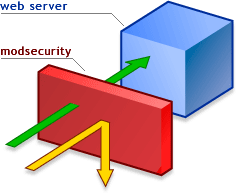
Even though the security of a Web server depends largely on the scripts run on it and the programmers who write these scripts, a server can be protected independently of these factors. An excelent solution to dis problem is a free Apache module called mod_security.
The mod_security module can be downloaded from the www.modsecurity.org site. Installing the module allows new request-filtering directives to be specified in the httpd.conf file. The most interesting of them are the following:
- SecFilterEngine On — Enables the request filtering mode.
- SecFilterCheckURLEncoding On — Checks the validity of the URL encoding.
- SecFilterForceByteRange 32 126 — Specifies to use characters from the particular range only. There are quite a few control characters (e.g., carriage return and line end) whose codes are less than 32. Most of them are invisible but require the corresponding key presses to be processed. How can such a character be entered into a URL string? This can be done using their codes. For example, the end-of-line character is entered in a URL by typing %13. In this case, a URL cannot contain character codes less than 32 and greater than 126.
- SecAuditLog logs/audit_log — Specifies the log file, in which the audit information is to be stored.
- SecFilterDefaultAction "deny,log,status:406" — Specifies the default action. In this case, it is prohibition.
- SecFilter xxx redirect:http://www.Webcreator.com — Provides for redirection. If the rules have been met, the user is redirected to www.webcreator.com.
- SecFilter yyy log,exec:/home/apache/report-attack.pl — Launches a script. If the filter is triggered, the /home/apache/report-attack.pl script will be executed.
- SecFilter /etc/password — Prohibits referencing the /etc/passwd file in user requests. Referencing the /etc/shadow file can be prohibited in the same way.
- SecFilter /bin/ls — Prohibits users from accessing commands. In this case, access to the ls command is prohibited, which can be used to view contents of directories if a script contains a bug. Access to such commands as cat, rm, cp, and ftp should also be prohibited.
- SecFilter "\.\./" — Prohibits dots in URLs. A classic attack is carried out by placing dot characters in a URL.
- SecFilter "delete [[: space: ]]+from" — Prohibits the delete...s from text, which is most often used in SQL queries to delete data. This string is used frequently in SQL injection-type attacks. In addition, I recommend setting the following three filters:
- SecFilter "insert [[: space: ]] +into" — Prohibits the string used in SQL queries for adding data.
- SecFilter "select.+from" — Prohibits the string used in SQL queries for reading data from a database.
- SecFilter "<(.|\n)+>" and SecFilter "<[[:space:]]*script"— Protects against cross-Site Scripting (XSS) attacks.
-
The preceding are the main methods that can be used to enhance the security of your Web server. Server networks can also be protected in this way. Additional information can be obtained from the developer's Web site.
5:32 AM 0
How To Get Back Your Hacked Google Account


As Google Account is a single account used across all Googles services like Gmail, Orkut, Blogger, Adsense, Checkout. etc, it can turn out to be our worst nightmare if it gets hacked!
Like many other online services Google tries to protect your account with secret question as well as optional secondary email address. But there is one more official option which only Google Provides!
Now lets go step-by-step…

#1. Note Down the verification code.
Whenever any account is registered with GOOGLE, it gives some confirmation messages and provide you a verification ID. Note down that verification id . If you are having that, recovering your account is just easy as burning a match stick.
#1. Trying “Forget Password” Option
I know this will not work in most cases, as options like forget password rely on secondary email address and security question, both of which can be easily changed once a account gets hacked. Still you should try atleast once as most password gets hacked by script kiddies and not by real hackers.So go to Forget Password form first!
#2. What if “Forget Password” Option Fails
You can submit a form to Google in which you can provide details about your Google Account usage.Details include information which most likely only real owner can provide. Here are few things for example…
- Last successful login date
- Account creation date
- Google products you used with this account and the date you started using each one
- Details about Orkut account (if you use Orkut)
- Details about Blogger account (if you use Blogger)
“Please answer each question as thoroughly and accurately as possible. If you’re not certain about some of the information, provide your closest estimate. Whether or not we can return your account depends on the strength and accuracy of your responses.”So I will suggest following things…
- Your goal should be to give Google maximum & accurate data! So take your time and submit form with maximum amount of information possible. You can consult your trusted friends if you are not sure. As an example it could be Sam or Bob who invited you on orkut. If you are not sure call them up and ask it!
- Submit only one form! Yes this should be common sense. Do not submit multiple forms. A person who uses around 10-15 Google products asked me if he can submit multiple forms mentioning different Google products.
- Submit form from the place which you use most often to access your account like PC at home! Although they haven’t mentioned this explicitly, line above submit button says, “Please note that we need your IP address in order to resolve this issue. Your IP address will be captured automatically when you submit this form.”
#4. Another Bonus Option Added : Mobile Verification
Well for some advanced users, who come in category of TECH PEOPLE, google has incoporated a newest feature. they can evn register their mobile number with their particular account. However google will verify by sending the activation code on your Cell, and then wud ask you before regisering your number with your account. This is included inthe process so that no other user can get the Recovery Activation code on his cell phone.
To register your mobile with this process, Go to your Google Account Settings, Click on Change Password Recovery Options, And Then go for Adding Your Mobile with your account.
I advise everyone to have a look at this form and information it asks. You can prepare a document about secret info, may be in cell phone or pen down it on a paper. This will come handy if something goes wrong in future!

I guess I have offered my best possible help on the issue. It may or may not work but thats all I can do. So do not mail me asking to hack any account!
Update: If you don’t remember any detail required in the form or you just don’t get any reply from Google after submitting the form, please create a new account. There is no other option. Sorry. (October 26, 2010)
12:42 AM 0
How To Check Whether You are Victim of RATS or not ?
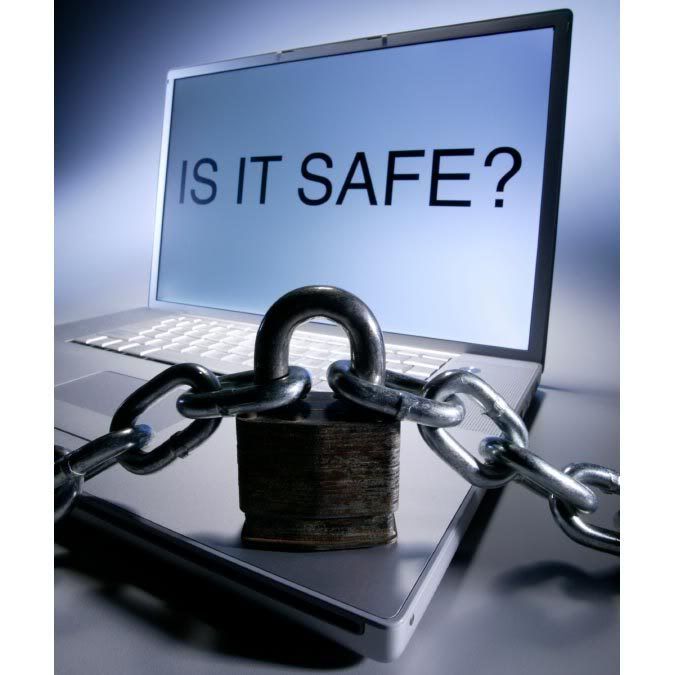
1. Now every program has their own process which can be seen on task manager. So the first thing to do is to find out which process the Trojan is being attached to. If you see some unknown process search that on google. A good hacker will always makes sure he hides its process with a Windows based Process, for eg. svchost.exe or something like that.
2. If you cant find, then the next thing you can do is use cmd (to open cmd prompt, Click on Start--->Accessories-->Command prompt).
3. Once Command Prompt is opened, use this command: netstat -an |find /i "listening"
Note: The NETSTAT command will show you whatever ports are open or in use, but it is NOT a port scanning tool!
Now we wonder What this Command does? This command will show all the opening ports. Now check for any unknown port.
4. You can skip step 3 if you want, and can do this instead.
Open command prompt and type netstat -b

Now this command will show you the active connections with the process with their PID (Process Identifier) and also the packets.
Look out for SYN Packets and the Foreign address its been connecting with , check the process its been associated with, check the ports also. If you find that its connecting to some unknown ports, then you can say you have been backdoored.
5. Go to your task manager. On the top of it, click on View---> select Column---> Tick on PID (Process Identifier).
Match the suspicious Process with the Processes In task manager, check PID also.

Now most of the RATs resides on Start up. How to delete them from start up?
a) Go to regedit ---> HKLM\Software\Microsoft\Windows\Current version\Run
On the Right hand side, check for the process name which you find on step 4. if its not their. Check at
HKCU\Software\Microsoft\Windows\Current Version\Run
OR
Open Cmd prompt & type start msconfig. Go to Startup tab, you can check the startup process there.

I hope This Tutorial was easy and comprehensive.
10:50 AM 0
How To Check Whether You Are Secure or Not.. Lamers Trick

>>Port Scanner<<
>>rDos<<
(click on them to Download)
Step One: First we need to find the websites IP Adress. This is very easy todo.
Ok so say they URL is http://www.yoursite.com ok now that you have your URL open Up Cmd todo this press Start>Run>cmd Once you have CMD open you type ping http://www.yoursite.com press enter and you will get the ip of the website. (YOU MUST REMOVE HTTP:// AND ANY /'s).
EXAMPLE:

Step Two: Now we must test to see if port 80 is open (it usually is).
This is very easy todo to Ok open up the port scanner you downloaded.
Once in the port scanner type in your Victims ip that you got from step 1.
It will ask you to do a range scan or a full scan (SELECT REANGE SCAN!) It will ask for conformaition you have to use a capital Y or a capital N! Now enter 79 for lowest port and 81 for highest hit enter than hit cap Y.
[X] = Closed
[X] Vulnerable = Open
EXAMPLE:

Step Three:
The final and easiest step (IF PORT 80 IS CLOSED PICK A NEW SITE!)
If port 80 is open your on your way to crashing!!
Ok open Up rDos that you download.
Enter the ip that we got from step 1.
It will ask you for the port to attack use port 80 that is why we scaned to make sure 80 was open! If it is closed it will not work.
Hit enter.. *=Flooding -=Crashed Or didn't connect!
EXAMPLE:

The site won't be directly offline!!
it starts with ***********
be patiend.. after some time it will go like this: **********-----------
that means the site crashed.
Thanks for reading i hope this helps. IF you have Any Queries Ask Them.
7:34 AM 0
Null Session Port Number 139 Vulnerability Of Windows Default Shares

Enabling file sharing on Windows machines makes them vulnerable to both information theft and certain types of quick-moving viruses. Macintosh and Unix computers are also vulnerable to file sharing exploits if users enable file sharing.
The SMB mechanisms that permit Windows File Sharing may also be used by attackers to obtain sensitive system information from Windows systems. User and Group information (usernames, last logon dates, password policy, RAS information), system information, and certain Registry keys may all be accessed via a “null session” connection to the NetBIOS Session Service. This information is useful to hackers because it helps them mount a password guessing or brute force password attack against the Windows target.
Systems impacted:
Microsoft Windows NT and Windows 2000 systemsCVE entries:
CVE-1999-0366, CVE-2000-0222, CVE-2000-0979, CAN-1999-0518, CAN-1999-0519,CAN-1999-0520, CAN-1999-0621, CAN-2000-1079
How to determine if you are vulnerable:
A quick, free, and secure test for the presence of SMB file sharing and its related vulnerabilities, effective for machines running any Windows operating system, is available at the Gibson Research Corporation web site at http://grc.com/. Click the “ShieldsUP” icon to receive a real-time appraisal of any system's SMB exposure. Detailed instructions are available to help Microsoft Windows users deal with SMB vulnerabilities. Note that if you are connected over a network where some intermediate device blocks SMB, the ShieldsUP tool will report that you are not vulnerable when, in fact, you are. This is the case, for example, for users on a cable modem where the provider is blocking SMB into the cable modem network. ShieldsUP will report that you are not vulnerable. However, the 4,000 or so other people on your cable modem link can still exploit this vulnerability.The Microsoft Personal Security Advisor, will report whether you are vulnerable to SMB exploits, and can also fix the problem. Since it runs locally, its results will always be reliable. It is available at: http://www.microsoft.com/technet/security/tools/mpsa.asp
How to protect against it:
Take the following steps to defend against unprotected shares:- When sharing data, ensure only required directories are shared.
- For added security, allow sharing only to specific IP addresses because DNS names can be spoofed.
- For Windows systems (both NT and 2000), use file system permission to ensure that the permissions on the shared directories allow access only to those people who require access.
- For Windows systems, prevent anonymous enumeration of users, groups, system configuration and registry keys via the “null session” connection. See item W5 for more information
- Block inbound connections to the NetBIOS Session Service (tcp 139) and Microsoft CIFS (TCP/UDP 445) at the router or the host.
- Consider implementing the RestrictAnonymous registry key for Internet-connected hosts in standalone or non-trusted domain environments. For more information see the following web pages:
- Windows NT 4.0: http://support.microsoft.com/support/kb/articles/Q143/4/74.asp
- Windows 2000: http://support.microsoft.com/support/kb/articles/Q246/2/61.ASP
Hopes You guys enjoyed the article, Enjoy Hacking Enjoy Hackton.
9:22 AM 1
Check Whether Your Antivirus Is best Or Not | Working properly Or Not

1. Open a notepad (New Text Document.TXT) and copy the following code exactly onto it, and save the notepad.
2. Rename the file from New Text Document.TXT to myfile.comEICAR Test codeX5O!P%@AP[4\PZX54(P^)7CC)7}$EICAR-STANDARD-ANTIVIRUS-TEST-FILE!$H+H*
3. Now run the antivirus scan on this myfile.com file.
If the antivirus is functioning properly on your computer, then it should generate a warning and immediately delete the file upon scanning. Otherwise you may have to re-install your antivirus.
NOTE: Most antivirus will pop-out a warning message in the Step-1 itself
You can also place the myfile.com file in a ZIP or RAR file and run a scan on it so as to ensure whether your antivirus can detect the test string in the compressed archive. Any antivirus when scanning this file will respond exactly as it will do for a genuine virus/malicious code. This test will cause no damage to your computer even though the antivirus will flag it as a malicious script. Hence it is the safest method to test the proper functioning of any antivirus.9:16 AM 0
How To Password Protect Your Linux Box (OS) With GRUB

GRUB, the Only bootloader for Linux OS, as NTLDR works in windows..
here , the basic idea for Securing the Linux box wiht GRUB is, we implies sum security on GRUB itself..The MOst basic Phase in Loading Of An Operating System.
However , Gettin bypassed with GRUb is also not that much difficult, its as easy as Burning a MATCH STICk, bt guys, i wud tell u that somehow later.
So wt the basic idea is, If you don't want someone booting your machine without permission, you can add a password to your GRUB entries. You can add a password only to specific entries if you wish; this will require a user to enter a password before loading only those boot entries you protect. This can be useful when done on your Recovery Mode entries, which bring up a passwordless root login by default.
To get started, let's first encrypt the password we want to use. Open up a terminal and enter the grub command. This brings up a grub shell. In this shell, enter the md5crypt command. When prompted, type in the password you want on your grub entries. (Don't worry, this won't write anything to your files!) After pressing Enter, you will be given an encrypted password string. Copy the string to your clipboard. Enter quit to exit the grub shell and return to bash.
Now that we have an encrypted password, it's time to add it to grub. Using sudo, open up /boot/grub/menu.lst using your favorite text editor.
To get started, let's first encrypt the password we want to use. Open up a terminal and enter the grub command. This brings up a grub shell. In this shell, enter the md5crypt command. When prompted, type in the password you want on your grub entries. (Don't worry, this won't write anything to your files!) After pressing Enter, you will be given an encrypted password string. Copy the string to your clipboard. Enter quit to exit the grub shell and return to bash.
Code:
GNU GRUB  version 0.95  (640K lower / 3072K upper memory)

 [ Minimal BASH-like line editing is supported.  For the first word, TAB
   lists possible command completions.  Anywhere else TAB lists the possible
   completions of a device/filename. ]

grub> md5crypt

Password: *************
Encrypted: $1$w7Epf0$vX6rxpozznLAVxZGkcFcs.

grub>
Note : if ur version of linux Box does not Encrypts password as such, Then you may have to Copy The encrypted passwrd frm the Shadow Fiel..(If U r having this case, do ask me, n i wud tell u the whole game IN step wise step manner)
After the "initrd" line for each entry you want to password protect, start a new line beginning with password --md5 and paste in your newly-encrypted password. Using the above example password on the i386 recovery entry, this:
Becomes this:
You must add such a line after every entry you want to password protect. As I mentioned earlier, I password protected my recovery mode entries out of sheer paranoia. 
Save the file, and reboot. (The first time you try this, I suggest only doing it to one entry so you can test it to make sure it works, and you can still use another entry to boot your machine in case something went wrong.)
For a bit of added peace of mind, you can prevent everyone except root from reading /boot/grub/menu.lst by doing:
______________________________________________________________________________After the "initrd" line for each entry you want to password protect, start a new line beginning with password --md5 and paste in your newly-encrypted password. Using the above example password on the i386 recovery entry, this:
Code:
title Ubuntu, kernel 2.6.8.1-2-386 (recovery mode)
        root (hd1,2)
        kernel /boot/vmlinuz-2.6.8.1-2-386 root=/dev/hdb3 ro single
        initrd /boot/initrd.img-2.6.8.1-2-386
Becomes this:
Code:
title Ubuntu, kernel 2.6.8.1-2-386 (recovery mode)
        root (hd1,2)
        kernel /boot/vmlinuz-2.6.8.1-2-386 root=/dev/hdb3 ro single
        initrd /boot/initrd.img-2.6.8.1-2-386
password --md5 $1$w7Epf0$vX6rxpozznLAVxZGkcFcs.Save the file, and reboot. (The first time you try this, I suggest only doing it to one entry so you can test it to make sure it works, and you can still use another entry to boot your machine in case something went wrong.)
For a bit of added peace of mind, you can prevent everyone except root from reading /boot/grub/menu.lst by doing:
Code:
sudo chmod 600 /boot/grub/menu.lst
Thats it u r finished with it.
Hopes u enjoy this., have fun. Enjoy Hacking.. Enjoy Hackton
8:14 PM 0
BitDefender Total Security 2010 *full and portable

Features and Benefits
Confidently download, share and open files from friends, family, co-workers – and even total strangers
* Protects against viruses and other malware using industry-leading technology NEW
* Scans all Web, e-mail and instant messaging traffic in real-time
* Provides an unmatched detection rate of new threats based on two different proactive technologies
* Blocks spyware programs that track your online activities
Protect your identity: shop, bank, listen and watch, privately and securely
* Blocks web pages that attempt to steal your credit card data
* Prevents personal information from leaking via e-mail, Web or instant messagingNEW
* File Shredder permanently erases sensitive files and traces of files
Guard your files and conversations with top-of-the line encryption
* Instant Messaging Encryption keeps your conversations private on Yahoo! and MSN Messenger
* File Vault securely stores personal information or sensitive files
* Automatically backs up files and folders
Connect securely to any network at home, at the office, or away
* The two-way firewall automatically secures your Internet connection wherever you are
* Wi-Fi monitor helps prevent unauthorized access to your Wi-Fi network
Protect your family and their computers
* Parental Control blocks access to inappropriate websites and e-mail
* Limits kids’ access the Internet, games, etc. to specific times
* Makes it easy for you to manage the security of your network from a single location
Play safely, play seamlessly
* Reduces the system load and avoids requesting user interaction during game play
Get fine-tuned performance from your computer!
* Removes unnecessary files & registry entries, for improved performance
* Optimized scanning technology skips safe files for better scan speed and lower system load
* Antispam stops unwanted e-mail from reaching your Inbox
* Laptop Mode prolongs battery life
Let professionals solve any security issues
* Assistance with common issues built directly into the product
* Free technical support for the entire duration of the product license
DOWNLOAD:
portable
http://hotfile.com/dl/18066593/cfce231/BitDefender_Total_Security_2010.rar.html
full
Uploading Links :-
http://uploading.com/files/b39f5e5m/BD.totalsecurity.2010.32b.part1.rarhttp://uploading.com/files/m962c5d9/BD.totalsecurity.2010.32b.part2.rar
Uploading Links :-
http://uploading.com/files/5346fc68/BitDefender_2010_All_versions_Crack.rar
7:15 AM 0
How To Remove Default Admin Share : Vulnerability For 139 Port

When 139 port is open, one can easily create a null session by brute forcing this Share.
So, every security professional is supposed to Get Out of this , which may b done in folowing amnner.
System Key: [HKEY_LOCAL_MACHINE\ System\ CurrentControlSet\ Services\ LanmanServer\ Parameters]
Value Name: AutoShareWks
Data Type: REG_DWORD (DWORD Value)
Value Data: (0 = disable shares, 1 = enable)
This registry key actually stops the recreation of the shares, therefore it may be necessary to delete the shares through the drive properties also or you can also remove the shares through the Computer Management Console.
1. In Control Panel, double-click Administrative Tools, and then double-click Computer Management.
2. Click to expand Shared Folders, and then click Shares.
3. In the Shared Folder column, right-click the share you want to delete, click Stop sharing, and then click OK.
Note : To remove the admin share for only the current session use the second method (Computer Management console), if you want a permanent removal, add the AutoShareWks registry.
Hopes, u enjoyed this.
Any doubt or query do commenting or simply write to upgoingstar@yahoo.co.in
Enjoy Hackton
11:11 PM 0
12 Security Tips While Shopping Online

Shopping online isn’t just as safe as handing over your credit card in a store or restaurant. However, if you take care of few things it can be a safe deal. Following are the things you should take care of:
- Never respond to an email request for credit card details. All reputable companies will conduct transactions with you over a secure website connection.
- Remember to never respond to any email advertisement, and only visit sites you know or have book marked, and verify the address before browsing further.
- Only buy from trusted brands and websites.
- To ensure that you only do business with legitimate companies check to see if they have a contact number, an actual retail store and a printed catalogue to browse.
- Check a website’s returns and privacy policy before going ahead with a purchase.
- Check that you are entering your details through a secure payment connection. You should notice when you click through to the transaction page of a company’s website that the URL in the address bar begins https:// (instead of the normal http://). This is the standard encrypted communication mechanism on the internet and means that your credit card details are being sent securely.
- Beware of deals that seem too good to be true.
- Beware of the limitations of the internet. The internet may not the best place to buy clothes or other products you need to see, touch or try on.
- All reputable websites use secure payment systems. These are either a company’s own system or a 3rd party system such as Worldpay or Paypal.
- When conducting a transaction over the internet, look for the yellow padlock in the grey status bar at the bottom of your browser page. This is an indication that the transaction is being conducted over a secure connection.
- As an extra precaution check to see if there’s a gold lock at the bottom of the right hand corner of the browser. If they don’t include any of these reliable indicators, you might want to think twice before handing over your credit card number.
- To be on the safe side, and avoid Internet fraudsters, it’s also a good idea to install and use security software such as Kaspersky Internet Security. It can provide you with industry-leading security services that will provide you more protection against the latest threats.
7:49 AM 1
Subscribe to:
Posts (Atom)

 Posts
Posts


